Pages

February 18, 2013

How to Automatically Clear Private Data When You Close Your Browser

Web browsers normally save your private data – history, cookies, searches, downloads, and more – and only delete it when you ask. If you are constantly clearing it, you can have any browser automatically clear private data when you close it.
Note that, if you set your browser to automatically clear your cookies when you close it, you will have to log into the websites you use each time you open your browser. Clearing cache files will cause websites to load more slowly after you restart your browser.

Google Chrome

Google Chrome doesn’t include the ability to automatically clear all your private data when you close it. However, you can have Chrome automatically clear cookies on exit or use an extension to have it automatically clear everything.
To get started, open the Settings screen from Chrome’s menu.


Click the Show advanced settings link at the bottom of the Settings page.


Click the Content settings button under the Privacy header.


Under Cookies, select “Keep local data only until I quit my browser” and click OK. When you close Chrome, it will now automatically clear your cookies.


If you want to clear all your private data when you close Chrome, install the Click&Clean extension from the Chrome Web Store.
After installing it, click the Click&Clean button on your browser toolbar and select Options.


Enable the “Delete private data when Chrome closes” option under Extra. You can control which types of data will be automatically deleted using the options in this window.


Mozilla Firefox

Firefox has the built-in ability to clear all your private data when you close it – no extensions required. To get started, open the Firefox menu and select Options.


Select the Privacy icon and choose “Use custom settings for history.” Enable the “Clear history when Firefox closes” check box.


To control which types of private data Firefox automatically clears, click the Settings button and choose the types of private date you don’t want.


Internet Explorer

Internet Explorer has the built-in ability to clear its private data when you close it, too. Click the gear icon and select Internet options to get started.


On the General tab, enable the “Delete browsing history on exit” option.


Click the Delete button to customize which types of data Internet Explorer will clear. You may want to uncheck “Preserve Favorites website data” or Internet Explorer will keep cookies and cache files for websites you have saved as favorites.
Click the Delete button when you are done. Internet Explorer will immediately clear your private data and then clear it each time you close your browser.


Opera

Opera doesn’t include a feature that can automatically delete all your private data when it closes. However, you can have Opera clear cookies and cache files automatically, as well as prevent Opera from saving your browsing history.
To get started, open the Opera menu, point to Settings, and select Preferences.


On the Advanced tab, select Cookies and enable the “Delete new cookies when exiting Opera” option. Opera will clear any new cookies each time you close it.
Note that this won’t clear any cookies you already have in Opera. To clear them, use Opera’s Delete Private Data tool or click the Manage Cookies button.


Select the History section and click “Empty on exit” to have Opera automatically clear its cache on close. You can also set the Addresses box to 0 to have Chrome never keep a history of websites you visit.


To clear all your private data in Opera, you will need to use the Delete Private Data feature manually or use private-browsing mode when accessing websites you don’t want appearing in your history.

Note that you will have to close your browser entirely to clear its private data. For example, if you have several Firefox windows open and only close one of them, Firefox won’t automatically clear all your private data. You will have to close every Firefox window first.

Source: http://www.howtogeek.com/137681/how-to-automatically-clear-private-data-when-you-close-your-browser/?utm_source=newsletter&utm_medium=email&utm_campaign=170213

February 15, 2013

The Art Of Creating A Successful Blog – Tips From The Pros


In an effort to understand the magic ingredients that make up the recipe of a successful website, I went out in search of successful bloggers that have formed popular, profitable websites. The fruits of that search turned up two big names in the blogosphere – Vitaly Friedman of Smashing Magazine, and Joshua Topolsky of The Verge.
Writing is such a personal, private thing. On the other hand, the act of blogging is such a public and transparent thing. When you put the two together, you have this highly visceral, raw act of casting ideas out into the Internet.

It’s hard to imagine that those ideas could ever grow into something highly successful, popular and dare you hope – profitable?

There are a lot of very cool stories out there about how some of the world’s most popular blogs and websites got started. Look at the story of Arianna Huffington. She began her online writing career with a website called Resignation.com, where she burst onto the scene calling for the resignation of President Bill Clinton. From the founding of The Huffington Post in May of 2005 to its acquisition by AOL on February 7, 2011, Arianna and her team of journalists established one of the most popular news blogs on the Internet.
Then you’ve got a site like the Daily Beast, founded in 2008 by Tina Brown and Barry Diller. It eventually grew and merged with Newsweek to become the “online home” of Newsweek Magazine. Then there’s the story of Darren Rowse, one of my favorite bloggers, who quit his job working as a laborer to try and earn a living through blogging. He founded b5media in 2005 with fellow bloggers, he founded the extremely popular site ProBlogger, and openly admits that today he comfortably earns a six-figure income through blogging.
It doesn’t end there. You’ve got Gizmodo, Gawker, TechCrunch, Mashable, SmashingMagazine, TMZ, The Verge…the list goes on, and I’m sure many readers here have their own personal favorites.
So, what’s the secret? How do certain sites do so well, while so many others fall by the wayside?


Why I Turned to Blogging

According to WordPress.com, there are over 60.6 million WordPress.com hosted blogs across the entire world. That’s right. Million. There are over 100,000 new WordPress sites created every single day. It’s difficult to get an accurate picture of just how many websites are created on the Internet every day, but if just the WordPress stats are any indication, the number is massive.
Much like Darren Rowse, I turned to blogging more out of necessity than anything else. We were due to have our first child, my wife would no longer be working, so we needed income. I attempted to buy and sell antiques on Ebay to make extra income. That effort was moderately successful – I did manage to establish a Powerseller status with 100% positive ratings – but the work was enormous and the resulting profit was miniscule.
So, I turned to a passion that I’ve had since I was just a kid – writing. I’ve always had an overwhelming love for the written word, and the joy created by a well-crafted sentence. At the time in 2006, I didn’t think it was possible to really earn anything by writing, but I started doing it online just for the joy of it. I loved crafting articles, and if I could earn a few pennies in the process, all the better.
My story was a long road of countless late nights writing blog entries and articles for peanuts, and an endless search for newer, better-paying clients. Of course, there was also lots and lots of coffee. Probably too much coffee.


Fast forward to 2012. I now write for one of the top technology blogs on the Internet, I am an editor and writer for an educational technology site, and in 2009, I founded by own blog called TopSecretWriters – my first endeavor independently publishing my own work, which would provide no immediate income in return at the start.
No – TopSecretWriters was different. It wasn’t work. It was less about making money, and more about having lofty goals and ideas to share that I am passionate about. It was my way of tossing my message in a bottle into the vast ocean of the Internet, hoping that someone would eventually read those words, and that it might inspire them to bring friends.
Today, I would consider myself to be a moderately successful blogger. I earn a comfortable income writing for others, and my own site is what I would consider to be an on-the-rise new blog, on the cusp of breaking through into that magical area of financial self-sufficiency. It’s an exciting time.
Considering that I’m about halfway up this mountain that so many before me have climbed, I decided to take a breather and take a closer look at those explorers that have come before – co-founders of their own websites that are wildly popular today. Both of these writers are passionate about the work they do, and they both lead websites that nearly everyone reading this article will recognize.
I am speaking of none other than Vitaly Friedman of Smashing Magazine, and Joshua Topolsky of The Verge.
Both of them have agreed to give us a little bit of insight – and dare I say some inspiration – into what it takes to create and grow popular and extremely successful websites on the Internet today.


The Verge – Editor in Chief Joshua Topolsky


The Verge is listed around the web as one of the top 10 technology blogs out there. It is unique in that it covers not just tech news, but focuses holistically on the entire culture of technology and science in the world today. Its rise to fame has been astonishingly quick – the site was only founded in 2011 and began making it on the top 10 lists shortly thereafter.
Joshua Topolsky, co-founder and editor-in-chief of The Verge, agreed to sit down and chat with us about the founding of the Verge, and what he felt gave it the ability to grow so quickly, so fast.
Of course, my first question was exactly that – what made the site so popular? His response – repeated throughout the interview – was actually rather simple. His secret to success is teamwork.
“The two people that founded the site were myself and Marty Moe. We kind of cooked up the idea and co-founded the site, but we have a group. Even though we’re the founders, there’s a group of editors that were here from the very beginning that built the site into what it is.”
That’s fantastic, however, your about page also mentioned a partnership with Vox Media, was that from day one as well?
“It was originally a site called SB Nation, which is a network of sports blogs. When Marty and I brought the idea for Verge to them, we sort of decided that we needed to form a new company. That new company became Vox, and now Vox is The Verge, SB Nation, and then Polygon, which is a games site that we launched in the middle of 2012.”
Joshua told me that Jim Bankoff, the CEO of SB Nation, decided to fund the founding of The Verge, and in collaboration with him and Marty, they founded the site while also creating a new company called Vox Media.


Getting a Seed Investment Will Propel Growth
Of course, in my search for elements in the founding of The Verge that could have contributed to the rapid success of the site, my next question seemed obvious.
I asked whether the support of SB Nation meant he and Marty had outside investors seeding The Verge.
“That’s right, in the sense that SB Nation is a privately funded – venture capital funded business, and now that has grown into Vox Media. So we are privately funded by venture capital.”
Do you think that contributed to the speed that the Verge grew and become popular so quickly?
“There’s certainly no question that having an established platform and having money is always good, but we obviously had a great editorial team to start with, and we broke a lot of news early on.
A lot of these editors came from Engadget, where I was editor-in-chief. Most of the senior staff left there to start a new site. So, we had a following to start with, and it was actually kind of surprising that when we started the first site This Is My Next, we got a little bit of a groundswell from that. No money, no advertising – it was pretty much a WordPress site, very basic. We started to see pretty huge traffic on it. That was our first indication that we were on the right track, just doing something independent and on our own.
I think we brought a bit of an audience who knew us from our previous work. And, you know, I think we came out of the gate really big, and that’s thanks to the platform and the investment, and the team.
From the start, my thinking was, it’s very hard now just to start a small blog with a couple of people working at it. In our sphere, in the world of technology culture, there’s a lot of competition. It’s very hard to start something small and grow it very big in a short amount of time.”
I asked Joshua whether The Verge is intentionally very news-focused.
“Very news focused, and very culture focused. You look at our front page right now, we’ve got this in-depth exclusive piece on the design of Google; we have a piece on how scientists found this giant squid that the Discovery Channel is doing a documentary on. If you look at everything at the top of our site right now, it’s a real mixture of culture coverage, science coverage, and tech coverage. So, that’s right where we wanted to be from the get go. It was kind of like biting off a lot. We knew that we couldn’t do that if we were just starting a WordPress site and having just a few people writing for it. It would be very difficult to capture everything we wanted to capture.”
So, how did you manage to make the linkup that you needed with venture capital at the beginning?
“We knew the CEO of SB Nation. He’s a guy named Jim Bankoff, who used to be at AOL. Jim was actually the guy who was responsible for bringing weblogs [Weblogs Inc.], which Engadget was part of, to AOL when he was there. He had been working on SB Nation, and he was the CEO.
He actually reached out early on when he heard that some other people and I were leaving. Essentially, we had a conversation and we decided that this was a partnership that we wanted to get into. It was just a good fit. He understood where we were coming from, and he knew the troubles that we had had – trying to make something work at AOL, because he had been there.”
What this feedback from Joshua made clear is that there is a lot to be said for how much investment you have up front when starting a blog. While there are lots of things that can lead to success – like a great editorial team, brilliant content ideas and a beautiful layout – ultimately the principle of “money talks” still holds true in the world of blogging.
At the very least, it can dramatically improve your odds of success in a shorter period of time.

The Importance of Telling a Good Story
Still, when you look at The Verge, it’s obvious that the team there really has an edge up on the competition. The stories jump out at you, the layout pops, and the writing is high-quality and clearly carefully done. News articles are carefully researched, and the technology updates are quick and timely.
It was obvious to me, just from exploring the site, that there was a lot more to the success of the site than just a bunch of venture capital.
I asked Joshua, what, if anything, he felt were the top one or two things that helped The Verge stay above the competition? Joshua said that funding was important, but it became more apparent during the course of our phone conversation that what lies at the heart of The Verge’s success is a close-knit, highly professional team of editors.
“I think the investment and the great editorial team is the number one thing. I mean, we’ve done a lot of things that are different and new in terms of our site design, the way we wanted to do features and the way we wanted to do reviews. That all comes from a huge collaboration among editors. In my opinion, you’re only as good as the team that you have. My goal, and the goal of every editor here was, let’s bring the best people together to collaborate.
And so, the number one thing that I am thankful for and that I think we did right is we found great people to work together. We pushed them, and they pushed us and collectively we came up with big stories and scoops and really good stuff that we put in front of an audience.”

That actually brings up a good point. Do you think that it could have been those big stories you hit on early that might have sky-rocketed your growth?
“I’m going to say that it was a combination of factors. You start to tell a story when you make something for yourself and when you put it out into the world. There’s a narrative that’s created. And I think there was a narrative about us, and people were like, ‘Hey, what’s going on with these guys? It might be interesting to find out what they’re doing.’
But then, not only having that, but actually delivering on stuff that is interesting is very important.”
Are there any early stories that really stand out in your memory as, “Hey this is the first big story that we hit on and it was huge?”
Joshua laughed a bit before answering. After he recovered a little, he explained:
“We had a big appetite for doing long-form stories, with big layouts and a big video component – really dutifully produced video. One of our first big features was called ‘Condo at the End of the World’, which was a piece about these people building survival condominiums in the middle of the desert. And, you know, the reaction to that was huge. People really got it, and the video was really intense.
That was the first week we launched I think, and when I saw the reaction to that – people saying ‘Woah, look at this layout and look at this story’, and it was shared in all kind of places. It’s then that I thought that our idea, what we had, was really going to work and that people got it, immediately.”
Long Form is the New Form
One of the long-standing “rules of thumb” in the world of blogging is that people are not interested in sitting at the computer and reading through a long blog post. The general rule was that the perfect length for an article was an average of 600 to 1200 words, and any longer than that you would lose the reader.
What you’ll find at The Verge is that while there are certainly plenty of short and quick news entries or blog updates, you’ll also find a great many long-form features of well over 2,000 words. Many of them also feature huge, beautiful photos or well-created video clips.
It’s clear that – true to its name – The Verge is staying right on the verge of the next big thing in blogging.

Joshua explained this change in strategy – going against the grain of the “old way” of blogging.
“Before that, before we started publishing these long-form, investment pieces, there was this sense that people didn’t want to read big stories, or that they wouldn’t want to read long stories, or that they weren’t interested in spending the time.
In the summer of 2011 when we launched, it was really a strong sentiment. People want it fast, cheap and dirty, right? But when we started publishing this stuff, there was an immediate, clear appetite for it. That was a big indicator to me that things were actually going to work.”
Are there any moments that you would have done differently – something that today you would consider to be an amateur mistake?
“The hardest thing has been allowing ourselves to break old habits, and let ourselves experiment more, and let ourselves get into uncomfortable places in the sense that, ‘Hey maybe this will work and maybe it won’t, but we’re gonna give it a shot because we believe in it.’ That’s one of those things that takes a little while when you’re coming from a world of, ‘Hey, you gotta crank out a post every twenty minutes.’
When you come from that world, your brain just works a little bit differently. So, something we work on every day is trying to break all those old bad habits of just straight blogging, and instead thinking about the bigger picture and the bigger story.”
What if You Could Do Anything You Want?
One unique feature of The Verge is that it utilizes its own custom platform. It isn’t WordPress-based. I asked Joshua whether that was actually limiting at all in any way, since there weren’t the library of ready-made tools available to “add-on” to the base platform.
Joshua didn’t hesitate to point out that the Vox platform was an advantage, not a disadvantage, because it allows The Verge team to create in ways that were previously not possible in the former old-style “blog” format.
“I think the platform is just a blank page. I think our platform now is just a big, open book. The trick is figuring out how to draw on the page, you know? When you start to remove the limitations, when you say well I used to only be able to do this single column blog post but now I can do these big, beautiful features; when I have a video team and I can do these sort of mini-documentaries; or I want to put a new show on our site and crank up a new podcast or crank up a new weekly or monthly video show – you start to go, man I can kinda do whatever I want.
You have to start to get into the mindset of how do you sculpt that? If you could do anything you want, it can be very chaotic when you don’t know exactly what you want to do or how you want to do it. I think a lot of our past year of launch has been building our structure and how to make each page really beautiful and valuable.”
Joshua’s approach is actually very unique in today’s “search-focused” world of blogging, where bloggers are constantly tracking their page stats and looking for ways to boost those stats. Joshua says that he decided to throw that whole mindset out the window, and return to what many would view as the old-school magazine-editing approach of, if you build something interesting and beautiful, the readers will come.
“From day one, my number one mandate to everyone has been, don’t chase page views. Don’t chase what you think people will like, chase the stuff that you think is really cool. Go after that. We’ve trusted our instinct a lot, and our instinct has been right a lot. That gives me a tremendous sense of excitement about going forward.
I’ve just found that if you have a team that you trust, and everybody is working together, you can make assumptions, you can make calls where you might be nervous in other situations. You can say, hey lets go with our gut on this. If you think it’s good, let’s run it. Let’s tell the story. That’s been really great for us.”
One key message I kept hearing from talking with Joshua was the importance of thinking big and stepping outside of the box – going outside the comfort zone. It’s certainly easy for bloggers to get into the daily routine of making posts and sticking to a site design that everyone says is “right”, but Joshua’s message is about being different.
It’s about standing out and doing things that make people look at you and say, “Wow, check out what this blogger’s up to.” That’s when the magic happens.

Smashing Magazine – Editor-in-Chief Vitaly Friedman


I was very excited to have an opportunity to chat with Vitaly Friedman, the editor-in-chief and co-founder of the ever-popular technology blog – in fact one of the leading web-design blogs on the Internet – Smashing Magazine.
The rise of Smashing Magazine wasn’t quite as fast as The Verge. It was founded in 2006 by Sven Lennartz and Vitaly Friedman. The site has been a favorite for web designers from the very start, but it also does focus on other areas of technology like software and web tool reviews.
Much like MakeUseOf, Smashing Magazine has a staff that spans the globe and comes from many different nationalities and religions. The site has been ranked across the Internet as one of the top 10 tech blogs, and easily one of the top 10 web design blogs in the world.
So, it was a real honor to talk with Vitaly Friedman about what he felt made Smashing Magazine such a smashing success.
Growing a Site from Scratch
I started the interview asking Vitaly about the first year that he and Sven founded Smashing Magazine, and what their hopes and dreams were for the site.
“To be honest, we didn’t have any big plans or ambitions when we launched the site back in 2006. It was all a random experiment. We hadn’t really planned anything at that point. I didn’t have any hopes or dreams or fears about the site, it just felt like something we did on the side. Something that didn’t really matter much.
I still love this feeling of creating things that aren’t perfect, aren’t quite right, aren’t permanent. It gives me a reason to go and change them, optimize them, improve them, make them different. I used to be a perfectionist, but I don’t strive for perfection any longer — it’s meaningless.”
Smashing Magazine was founded in September of 2006, and three years later in 2009, WebDesignDev voted Smashing as one of the top 30 web-design blogs, and in 2012 Daily Tekk listed Smashing as one of the top 10 for creativity and design. IncomeDiary listed it as the 5th best income-earning blog on the Internet.
From that first day, to the success of 2012, what would you say went as expected, and what turned out completely different than you had imagined?
“Well, since we didn’t have any expectations, things ran quite smoothly, to be honest. We had ups and downs of course, but it was a matter of doing the right thing properly. It has always been very important for me to create something tangible and valuable for designers and developers to use. Just like I learned so much from the numerous blog posts back in 2002-2004, I wanted to give back, and I wanted to create something that would help me in my daily work as a freelancing designer as well.
What I didn’t know is that at some point we’d take a very different editorial route, moving from ‘pop/masses’ articles like ‘50 Fantastic Grungy Wallpapers’, to a respectable, professional publication in which every article goes through a number of reviews to make sure that it meets the high quality standards that we set for our publication. It surprises me how things have changed over the years, and I am truly proud of this change.”
If You Build It, They Will Come…Eventually
Was there a lot of up-front investment and loss required to get that early growth started? Can you share at what point that Smashing Magazine became profitable, and what that felt like?
“To be honest, we didn’t have any investment at all apart from the time investment for writing the articles and publishing them online. We started out without advertising, because we had no idea that someone would be interested in what we did. But then, as we saw more and more traffic coming in, we added Google AdSense ads to at least cover the traffic costs. It worked pretty well quite quickly.
Because we had no huge costs and worked as a two-and-a-half-people-team, everything was quite straightforward. It was only in late 2009 that we finally founded a company and hired people to work on our Smashing Books and eBooks. Smashing Magazine itself became profitable around 8-12 months after it went live.”
Here, Vitaly describes a completely different path to success, not much unlike that of MakeUseOf, in fact. No major external investment, just a couple of guys working had at building the site from the ground up. This is almost a direct example of the scenario Joshua described above as a “very hard” task.
What the story of Smashing Magazine reveals is that the job isn’t impossible – it just takes longer, and it requires a big dose of drive, motivation and perseverance.

Is there anything you would have changed about how you managed the website through the years? Were there lessons learned that you would love to go back and do better?
“I don’t regret my decisions, and I think that growing traffic in the very beginning was the absolute right decision to make. We did have a very weird and unpleasant reputation for a while due to that. Quality control, proofreading and the editorial guidelines weren’t quite developed yet, which caused a quite strange phase in the evolution of the site. With the history of the site and the poor level of grammar, the articles did feel a bit… personal and humane, but it didn’t help us in building a good reputation, so I might want to revise that phase in our history.
I would also not take too many projects at once, and would prefer to work on just a few projects to make sure that they are done/built properly. It’s really very important. Also, make 
sure that you learn how to give up full control over your work. At some point, you’ll realize that you can’t do it all alone, and you have to learn to communicate your values and your philosophy. It’s not as easy as one might think.”
Are you able to offer start-up bloggers out there some tips and advice about what it really takes to build a successful website like Smashing Magazine on the Internet today?
“There is no magic recipe for that. I believe it’s often a matter of writing about something that’s important to a group of people at the right point in time. If you are an expert in your field, you already have something to say, so this could be your niche to write for. Don’t be afraid to go niche, that’s a fantastic opportunity to start something small that can then grow into something bigger.
And don’t think about actually building something huge and successful. Care deeply about your little creation, let it flourish and grow slowly, curate it, and you will see that it will reap fruits that you could only hope for. You just have to care and put your heart into your creation. But, the chances are that it won’t work at all if you see it as a job or as work. You have to be personal, honest, authentic, transparent, and write about what you love doing. Then people will find you, and they will come back to you.”

The Secret Recipe of Success

Smashing Magazine and The Verge are two of the best success stories on the Internet over the last few years. What I love about these two successes is that their paths to get there are so different.
In the one case, you have a site that grew to fame in less than three years, with strong financial backing and a crack editorial team. In the other case, you have a website started out by two guys as a labor of love, that eventually grew to become rated as one of the highest-income tech sites online.
Two widely different paths to a place of success that countless bloggers and website owners out there are envious of. So what are the common ingredients in the recipe of blogging success? What are those key elements that brought more and more readers to both Smashing Magazine and The Verge?
When you’re talking success, and just taking these two success stories into account, it looks like there are three major factors.
The first is writing about what you love. The Verge editors left one place to launch a new site in a format and style that they loved. Vitaly and Sven focused on a niche that they loved to write about.
The second is quality. Joshua explained that The Verge had an expert team of editors from day one – offering a major advantage in quality from day one. Vitaly described evolving Smashing Magazine through an awkward stage of growth into a place where published pieces that go through several stages of review.
Finally, the third element is finding a way to be unique and new. Vitaly describes the value of getting a foothold into a niche of your own and then growing your position there. Joshua describes the importance of getting away from the “old way” of doing things, and instead allowing yourself to get into uncomfortable places, to experiment with new things.
Both of these stories – that of The Verge and of Smashing Magazine – are success stories, but what’s important to remember is that they are also very different stories. They reveal that regardless of the path you take, success comes to those that – in Vitaly’s words – write about something that’s important to a group of people at the right point in time.
Now is always the right point in time. The only question is what you believe is important enough to write about, and then make it happen.
Abstract Earth via Shutterstock,Laptop and Cup of Coffee via Shutterstock
Want to write a long-form feature for MakeUseOf? Email Erez.

Source: http://www.makeuseof.com/tag/the-art-of-creating-a-successful-blog-tips-from-the-pros/?utm_campaign=newsletter&utm_source=2012-02-15

January 24, 2013

Microsoft ships IE10 for Windows 7 preview, hints at launch this year

Long-awaited upgrade comes with 'Do Not Track' privacy feature switched on


Gregg Keizer
November 14, 2012 (Computerworld)
As expected, Microsoft on Tuesday shipped a major preview of Internet Explorer 10 (IE10) for Windows 7, using a moniker that hints at a final release as early as next month.
Called IE10 Release Preview, the sneak peek arrived early Tuesday. On Monday, a Chinese blog, citing Microsoft's head of IE marketing, said the preview would appear Nov. 13. Although Microsoft declined comment at the time, saying it did not respond to "rumors or speculation," the Redmond, Wash., developer issued the early look Tuesday.


The Release Preview is for Windows 7 only. IE10 for Windows 8 and Windows RT shipped alongside those operating systems on Oct. 26, and older OSes, including XP and Vista, cannot run the browser.


Microsoft was the first, and so far, only, browser maker to drop Vista, just as it was the first -- and again, the only -- developer to abandon Windows XP last year when it shipped IE9.
While Microsoft has not revealed a timetable for delivering final IE10 code, IE9's pace last year provides a clue.


The designation of IE10 as "Release Preview" indicates a nearly-done browser, akin to what Microsoft used to call "release candidate" builds. In 2011, IE9 hit release candidate about a month before its debut on March 14 of that year.


If IE10 on Windows 7 keeps to a similar cadence, it could launch before the end of 2012.
IE10's most touted feature -- touch support -- is unlikely to be noticed, much yet used, by most people running Windows 7, since touch-enabled hardware for that platform is almost non-existent. Other backstage changes, however, may be apparent: Microsoft claimed IE10 was twice as fast as a now-outdated edition of Google's Chrome browser in one benchmark.
IE10 replaces the existing version of IE on Windows 7 -- it does not run alongside it -- but dissatisfied users can revert to the older edition by uninstalling the IE10 update. Microsoft has posted instructions for doing so in a brief online FAQ.


Like its cousin on Windows 8, the IE10 Release Preview comes with the "Do Not Track" (DNT) privacy feature switched on. A splash screen that appears when the browser is run for the first time notes that and provides a link to the steps necessary to turn off DNT.


Online advertising representatives have already called Microsoft's unilateral decision to enable DNT on IE10 as "unacceptable," and they'll likely to be angry when the browser reaches its final milestone on Windows 7. That's because Microsoft will automatically upgrade all Windows 7 users to the newest browser shortly after it launches.


Microsoft kicked off auto-upgrade last January. Both IE8 and IE9 profited from the move, as they are the newest versions able to run on Windows XP (IE8) and Vista and Windows 7 (IE9); the policy also accelerated the decline of IE7.


Since Windows 7 accounted for nearly 45% of all personal computer OSes last month -- a number sure to be even higher when IE10 officially launches -- the auto-upgrade will quickly move a massive number of users to a browser with DNT switched on.
IE10 for Windows 7 -- a 22MB to 43MB download for the U.S. edition -- can be retrieved from Microsoft's IE-specific site.


covers Microsoft, security issues, Apple, Web browsers and general technology breaking news for Computerworld. Follow Gregg on Twitter at Twitter @gkeizer, on Google+ or subscribe to Gregg's RSS feed Keizer RSS. His email address is gkeizer@computerworld.com.
See more by Gregg Keizer on Computerworld.com

Source: http://www.computerworld.com/s/article/9233596/Microsoft_ships_IE10_for_Windows_7_preview_hints_at_launch_this_year

January 23, 2013

How to Easily Create Your Own Google Chrome Theme (HowtoGeek.com)

How to Easily Create Your Own Google Chrome Theme

image


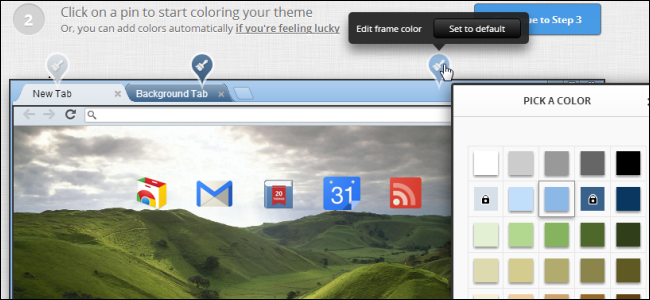
Google’s Chrome Web Store offers a variety of themes for Chrome, which include background images for your new tab page and custom colors. Even better — you can create your own theme in just a few minutes.
This official Google app allows you to quickly and easily create a custom Google Chrome theme, complete with a custom background image and color scheme. You can even share the themes you create.

Getting Started

We’ll be using the My Chrome Theme app from Google for this – click the link and install it from the Chrome Web Store. It will appear on your new tab page, where your other installed Chrome apps do.


Choosing an Image

The first thing you’ll need to do is choose a background image for your new tab page. You can either upload an image file or capture an image from your webcam.


If you’re uploading an image, you can choose a personal photo or any other type of wallpaper image, such as one of the images from our 100+ wallpaper collections. The below image is from our grasslands collection.


Adding Colors

On the next screen, you’ll be able to choose separate colors for the frame, toolbar, and background color. Of course, this is a Google app, so there’s an “I’m feeling lucky” button that will automatically select some appropriate-looking colors for you. The automatically selected colors will attempt to match the background image you selected earlier.


Installing Your Theme

Once you’re done, your theme will be generated and you’ll see an installation button that will add it to your browser. You’ll also get a link you can use to share it with others – just send them the link via email, instant message, Facebook, or anywhere else you can copy-paste a link. Of course, since this is Google, you can also share your custom theme on Google+ with a single click.

Source: http://www.howtogeek.com/134329/how-to-easily-create-your-own-google-chrome-theme/

January 18, 2013

Save Screen Space in Firefox by Converting Firefox Toolbars into Buttons


Most browsers are moving towards a minimalist approach and are consolidating menus, toolbars, and other program elements. If you want to maximize the website viewing area, and you use Firefox, there is an option for optimizing the space available in your browser window.
Buttonizer is a Firefox add-on allows you to quickly convert one toolbar at a time to a button on the address bar. To install Buttonizer, go to the Buttonizer page on the Mozilla Add-ons site using the link at the end of this article. Click the Add to Firefox button.


The Software Installation dialog box displays. Click Install Now.
NOTE: Depending on your settings, there may be a short countdown on the Install button before you can click it.

Once the add-on is installed, a popup window displays asking you to restart Firefox to finish the installation. Click Restart Now.

Once Firefox restarts, you’ll see the Buttonizer button on the right side of the Address bar. Right-click the button to see a list of toolbars that can be converted to a button. Select a toolbar from the list.
NOTE: Only one toolbar at a time can be converted to a button.

The selected toolbar closes. Hover the mouse over the Buttonizer button to access the toolbar you “buttonized.”

To view a convert a different toolbar as a button, simply right-click on the Buttonizer button and select another toolbar. The previously selected toolbar displays again and the newly selected toolbar closes and is available on the Buttonizer button.
To view all toolbars as toolbars again, select Reset from the menu.


Install Buttonizer from https://addons.mozilla.org/en-US/firefox/addon/buttonizer/.
Buttonizer is a very simple add-on, but it can be useful if you’re short on screen space.

Source: http://www.howtogeek.com/133856/save-screen-space-in-firefox-by-converting-firefox-toolbars-into-buttons/?utm_source=newsletter&utm_medium=email&utm_campaign=160113

January 15, 2013

Firefox 18 Gets Reviewed and Benchmarked Against Chrome 24, Internet Explorer 10


Keeping up with the schedule Mozilla has shipped another release of Firefox for Desktop. The latest release from Firefox has some really impressive features up its sleeves. It is noteworthy that majority of the changes pertain to under the hood improvements resulting in direct performance gains. As always, we will be comparing the top browsers based on benchmarks. This time around, we have also included the latest Chrome release, Chrome 24 which released closely following Firefox 18’s release.
How does Firefox 18 fare against Chrome 24 & Internet Explorer 10? Well, let’s have a look.


firefox cover
(image courtesy)

Faster JavaScript performance via IonMonkey compiler

IonMonkey Compiler succeeds Firefox’s own TraceMonkey, and JägerMonkey Javascript Compilers bringing in impressive performance gains of up to 26% which is incredible. The new IonMonkey compiler will be especially useful in heavy games and websites making extensive use of JavaScript. Speaking crudely, as Firefox is built on XUL which is again based on JavaScript, the new IonMonkey Compiler should definitely lay foundation to some solid speed improvements everywhere. On normal usage, the performance is agreeably more snappy than before, a welcome benefit especially if you browse JavaScript heavy sites. As you will see in the benchmarks below, IonMonkey does indeed benefit Firefox in performance considerably.

Support for Retina Display on OS X 10.7 and up

Firefox has been surprisingly slower on implementing Mac OSX feature support, be it trackpad gestures on Lion or Full screen mode. Nevertheless after Chrome, Firefox has finally added proper Retina-display support for Mac OS X Lion and above. This would come as a major relief as anyone who would have used a retina MBP would have encountered the sheer pain of using apps that do not support retina scaling and do their own sub-pixel rendering.

Preliminary support for WebRTC

WebRTC stands for Web Real Time Communication and is a open source initiative led by Google to enable open standards for communications like Voice Calling, Video Chat and P2P file sharing without any plugins. In simpler terms, you could think of WebRTC as open alternative to Microsoft Silverlight and Adobe Flash.
Google Chrome (obviously) was the first web browser to support WebRTC, followed by Opera. Finally, Firefox has done the catching-up act by implementing preliminary support for WebRTC. Remember though that the WebRTC standard is still not yet complete.

Performance Improvements

Apart from the newly introduced IonMonkey JIT, Firefox 18 features various other improvements as well.
  • Better Image Quality due to new HTML Scaling algorithm: A very old bug that was not marked as fixed until this release, resulting in better quality of images within websites. This fix had landed in Aurora as early as in October but obviously due to the release cycle, took quite while to land in the stable channel. You can see the difference it makes in this image. The one on the right is Firefox 18
  • Improvements around Tab Switching: Firefox 18 also improves upon tab switching performance, which should be subtly noticeable to casual users.
  • Lower Startup times : Firefox should now start a lot more quickly. Firefox earlier would unnecessarily check for a certificate which would end up in delay in startup due to time spent in validating. This has been done away with. The result is quite impressive and would be quite noticeable for all users.
  • Performance improvements for Proxy users :Finally Firefox 18 includes significant performance improvements for users using proxies. The reason turns out (funnily) that none of them at Mozilla used proxies, but acting upon a complaints about proxy performance lead to plenty of fixes in the network stack.

Firefox 18 vs Chrome 24 vs Internet Explorer 10

Benchmarks

This time around we included the top three browsers only, excluding Opera due its slouch for a long while. We have expanded our benchmarks this time around , with two new entrants Psychedlic Browsing and Peacekeeper. We have compared Firefox 18 against the most recent stable releases of Chrome and Internet Explorer respectively. ( Chrome 24  and Internet Explorer 10.0.1)
All the tests were performed on a HP-G42 478TX laptop with Core i3 2.40 GHz (first gen) processor, 6 GB DDR3 RAM, Western Digital 5400 RPM hard disk and ATI Mobility Radeon 6370M GPU running Windows 8 Pro with all the latest updates installed
Please note that all the add-ons were disabled in Chrome and Firefox. Also hardware acceleration was enabled across all the browsers

Sunspider

Sunspider, the much acclaimed JavaScript benchmark showed no visible gains….for Firefox. Continuing it’s tradition of kicking some serious arses in this benchmark ( which started with IE 9) Explorer 10 was around 32% faster than Firefox. Finally, it is about high time to end all those meme’s targeting Internet Explorer. Tsk Tsk.
image

Peacekeeper

Peacekeeper by Futuremark indicates overall performance of the browser by performing all kind of test a humble geek could think of for a browser. Tests vary from rendering HTML5 videos in various codecs, rendering webGL, DOM trees, Javascript assessment, 2D game performance, string manipulation tests and what not. Peacekeeper in a nutshell is a very comprehensive browser benchmark. Speaking of the scores sadly, Chrome demolished Explorer 10 and Firefox by margin of more than 85%, which might just point Mozilla dev’s that they need to look at other aspects of the browser as well apart from churning out the numbers. Explorer surprisingly matched up to Firefox quite well in this benchmark.
Something that should be duly noted is the lack of H264 codec playback in Firefox might have cost some loss in the score
image

Google Octane

Octane, the successor of the famous v8 benchmark performs various types of JavaScript tests, which emphasizes on performance of a browser in modern web applications. Firefox 18’s IonMonkey surely seems to help here, coming fairly close to Chrome this time around. This is a very naive assumption though, because the underlying tests could be fairly different between Google v8 and Octane. Explorer however was a sad story, coming a (very) distant third.
image

Psychedelic Browsing

You can take this benchmark with a pinch of salt just because it is developed by Microsoft. (seriously though, you be sure of anything without having a look at the source code, speaking of which reminds me that none of the IE Test Drive benchmarks are open). Just as expected, Internet Explorer bests the competition easily. However, Firefox is not far behind this time around with a pretty decent score. Chrome, for a change bites the dust.
image

Kraken

Perhaps the only comprehensive benchmark in our tests which has witnessed a lot of changes in browser performance over the course of time. There used to be a time when Chrome and Firefox would go neck and neck over in Kraken and at times Chrome would trump Firefox quite convincingly. Finally, we witnessed the contrary this time around (thanks to IonMonkey JIT for this). Firefox 18 beat Chrome 24 by a pretty wide margin. Also, we must stress the sheer quality of work being done on both the camps, with the scores improving (or falling, technically) with every release. The touted JavaScript improvements in both Chrome 24 and Firefox 18 show up clearly. Internet Explorer 10 though, decides to have a mind of it’s own.
image
Real World Performance : Memory usage
While gauging CPU usage for browsers is somewhat a tough job, checking memory consumption while being the easier chore often indicates the resource usage of a browser on a abstract level. This time, we have also included memory consumption when using a single tab, which agreeably quite a lot of normal PC users do.

Memory Consumption with Single Tab Open

What would be the site most of the PC’s would have open? Facebook. Pretty straight forward. We started each of the browsers afresh, opened Facebook and waited for two minutes after all the content had been loaded to get a sharp picture of memory consumption when idle.
image
Yup. We were surprised too. Internet Explorer 10 was the browser consuming least amount of memory. We re-did the tests, cross verified results with different tools to obtain the same result. Internet Explorer 10 is well ridiculously memory efficient with single (or few tabs open, say 2 3). Firefox was not lagging far behind as well, luckily. Though Chrome was the resource-hog clearly taking a ludicrous 315 MB to display a single Facebook tab.

Memory Consumption with 10 Tabs open

We opened 10 sites of varied complexity and waited for 4 minutes after all tabs were done loading for the memory consumption to stabilize. Firefox, quite simply displayed it’s natural strength which has been the result of very diligent efforts going into reducing memory consumption from past year, consuming only 370 MB! Internet Explorer and Chrome were far, far behind with the former bringing Chrome to shame with a impressive memory consumption of 621 MB. Chrome had successfully managed  that it’s idea of sumptuous lunch was gobbling your RAM at will.
image

Now for those Chrome fans who would argue that Chrome opens each tab in a separate process the memory consumption would high well, Internet Explorer 10 does the same but still keeps the memory consumption in acceptable limits. Ultimately, it is beyond doubt that Chrome needs to trim down it’s memory consumption.

Firefox 18 vs Chrome 24 vs Internet Explorer 10 : Where does each browser stand?

Internet Explorer [10]: While some would say that Internet Explorer 9 was Redmond’s redemption, Internet Explorer 10 goes way further and undoubtedly is a very solid performer that comprehensively beats Chrome, be it in either memory management or in a host of other benchmarks. The cool thing resulting from this is, all the not-so-tech savvy PC users who mostly do not even bother to download an alternative browser when they buy a new PC will not be browsing the Internet with some-substandard-pain-the-rear browser shipped with windows thanks to Windows 8’s Internet Explorer 10.
Internet Explorer 8, if you had forgotten which shipped with Vista/7 PC’s was so terrible that it almost took a small nap before it finally loaded. Oh, don’t rejoice that it is unmaintained yet, Microsoft is just done releasing a fix-it for Internet Explorer 7/8’s vulnerability

Chrome : Chrome 24 has definitely improved its performance especially in Javascript as touted, but no longer we can proclaim it as the “king” of the browsers. Both Internet Explorer and Firefox beat Chrome comprehensively in different tests. Also, Chrome certainly needs to work on the memory consumption. That said Chrome is a solid browser with special brownie points going to it’s UI responsiveness and hassle-free Chrome Sync.


Firefox : The devs at Mozilla are working really hard to improve Mozilla performance, and it truly shows. Firefox 18, as it’s obvious from these benchmarks, is giving both IE 10 and Chrome a good run for the money. BUT, the devs don’t seem to care about Firefox’s UI responsiveness. Yes, there is Project Snappy and we can observe some noticeable improvements in this release, but that still does not help Firefox; faring badly against Chrome and Internet Explorer. Page loading times are getting quicker with every release, neat but how about improving UI snappiness? Because responsiveness, and not benchmarks, drive people’s browser choice.


For more such updates, You can follow us on Twitter - @TechSplurge.

Browser Speed Tests: Chrome 24, Firefox 18, Internet Explorer 10, and Opera 12.12

from LifeHacker.com

Whitson Gordon

Windows 8 is out with a new version of Internet Explorer, Firefox has boosted its JavaScript power and memory usage, and Chrome's been slowly improving its speed. How do the new versions stack up against each other? We found out in our latest round of browser speed tests.
We've been testing browsers for awhile, and we've refined our method pretty well. It's a good mix of both manually timed user experience measures and hardcore JavaScript benchmarks, plus some new tests aimed at features like Chrome's prerendering or Firefox's on demand tab loading can really do. All tests take place on Windows (which is why we didn't test Safari—it isn't very popular on Windows, and testing the Mac version wouldn't give it equal footing).

As always, remember that speed is not the only thing each browser has to offer. Each browser has a number of unique features and characteristics, all of which you should factor into making your choice of which to use. However, while most features can be listed on their home pages, you can't easily compare their speed just from each browser's changelog, and that's why we've put this together. It's just one more way to compare the browsers as you make your decision. Also keep in mind that everyone's computer is different, and your numbers may differ from ours, but the comparison between the numbers should be the same.


Cold Boot-Up Winner: Chrome!

Chrome had a shockingly fast boot-up time this time around, popping up just over two seconds after we clicked its icon, ready to go. Explorer was pretty fast as well, with Firefox close behind and Opera slowing down quite a bit to take last place.


Tab Loading Winner: TIE Between Chrome and Internet Explorer!

Our test of loading nine tabs, from Lifehacker to Facebook to Hulu and Amazon, showed some interesting results. Chrome and Internet Explorer both dropped some time in this area, tying each other for first place, while Firefox absolutely crumbled under the weight of the tabs. Firefox's UI had so much trouble loading all nine tabs at once that its UI animations would completely stop while it caught up, finally loading them all after nearly 20 seconds. Whatever the Mozilla team has done, it makes the browser feel like its old, slow self again.


URL Loading Winner: Chrome!

As usual, Chrome took home the prize for visiting sites from the address bar, thanks to its awesome prerendering feature. However, Firefox and IE have definitely sped up a tad, too, meaning most browsers should give you a pretty quick page load as long as you've been to that page during this session—except Opera, who still took over a second to load the page.


Cold Restore Winner: Chrome!

Even though this test was originally determined to test Firefox's new on demand tab loading, it seems this feature no longer works during a cold boot—only during a warm boot. However, whether we tested cold or warm starts, Firefox still didn't seem to benefit from this feature at all. The Chrome team has really upped their game, making Chrome boot up super fast whether it has nine tabs in tow or not. While Chrome still had to load those tabs, it became usable nearly immediately after the window showed up, while Firefox took a little longer to boot and Opera kept us waiting quite a while.


JavaScript Winner: Chrome!

We've gone back and forth about whether to include JavaScript benchmarks in this test, because they're pretty artificial, despite most test's claim to measure "real world performance". In the interest of completeness, we've included it here, with the usual results (Chrome smoking the competition), but don't put too much stock in this over our other, more real-world tests. Due to issues with Mozilla's Dromaeo test suite, we used the popular Peacekeeper test from Futuremark this time around.


Memory Usage (with Nine Tabs Open) Winner: Firefox!

As usual, Firefox's memory management has improved greatly in the recent past, while Chrome's continues to shoot up to astronomical levels.


Memory Usage (with Nine Tabs and Five Extensions) Winner: Firefox!

Everyone's memory usage went up when we piled on five extensions, though Firefox's increased significantly less than Chrome and Opera's. As usual, Firefox took first place once again.


The Winner?

This time around, there was actually a very clear winner, but we've decided to stop tallying up the results and raking browsers in these tests. Why? Because we think you should decide for yourself! Everyone has different priorities, so we've decided to stop including a "winner" since the scores were impossible to weight fairly against one another. If you don't ever shut down your computer, for example, you can just ignore the cold boot scores. Don't like benchmarks? Throw out the JavaScript test. Have 12GB of RAM? Then memory management isn't really an issue. Check out the above results and see how the browsers stack up when it comes to your most important tests—and of course, weigh each browser's features—before you determine a winner.

Source: http://lifehacker.com/5976082/browser-speed-tests-chrome-24-firefox-18-internet-explorer-10-and-opera-1212

January 10, 2013

Firefox 18 Released

Download Firefox 18 Final

By | January 9, 2013 | 5 Comments

Download Firefox 18 FinalUp to 25% faster JavaScript with IonMonkey.

Good news for all your performance enthusiasts out there as Mozilla has just released the final build of the Firefox 18 web browser, which promises up to 25% faster JavaScript, thanks to IonMonkey.
What else is new? In addition to the eliminated animations for themes, Firefox 18 also includes tab switchin performance improvements, a support for Retina Display on OS X 10.7, initial support for WebRTC and a new HTML scaling algorithm, which is set to improve the overall image quality.

Firefox 18 Final Changelog
New:
- Faster JavaScript performance via IonMonkey compiler
- Support for Retina Display on OS X 10.7 and up
- Preliminary support for WebRTC
Changed:
- Experience better image quality with our new HTML scaling algorithm
- Performance improvements around tab switching
Developers:
- Support for new DOM property window.devicePixelRatio
- Improvement in startup time through smart handling of signed extension certificates
HTML5:
- Support for W3C touch events implemented, taking the place of MozTouch events
Fixes:
- Disable insecure content loading on HTTPS pages
- Improved responsiveness for users on proxies
Download
Firefox 18 Final

Source: http://www.favbrowser.com/download-firefox-18-final/ 


Firefox 18 joins Safari, Chrome with support for retina Macs

New release also offers JavaScript improvements and WebRTC support.


Retina MacBook Pro users who like lots of browser options have reason to rejoice with Tuesday's official release of Firefox 18. Those who own a 13-inch or 15-inch version of Apple's newest MacBook Pros will be able to view images, videos, and webpages in "retina" resolution (as long as you're running 10.7 or above), among the other new features that come with Firefox 18.


Firefox is now the third major browser to support retina resolutions on the Mac. It's no surprise that the first was Safari in the summer of 2012 (when Apple first introduced the 15-inch MacBook Pro) and Google released a version of Chrome with retina support last August. Though it has taken the Firefox team some time to join its browser brethren with this feature, it's certainly better late than never—especially for those who are die-hard Firefox users.
To support Retina displays, Firefox has also added JavaScript features to allow pages to detect the display resolution of the screen they're being rendered on and respond appropriately.


The new Firefox version also has a few features for Windows and Mac users who don't have Retina machines.


Firefox 18 has a new JavaScript compiler called IonMonkey. IonMonkey's predecessors, TraceMonkey and JagerMonkey, both had a fairly direct translation from JavaScript to executable code, limiting the number of optimizations that they could perform. IonMonkey creates a new intermediate representation of JavaScript programs that is optimized prior to generating executable code. Mozilla brags that IonMonkey is 26 percent faster than Firefox 17 in the Kraken benchmark, and 7 percent faster than Firefox 17 in the V8 benchmark.


The browser has also gained "preliminary" support for its standards-based video chat, Web Real Time Communication (WebRTC). Not all features are enabled by default, and in a brief experimentation we struggled to make it actually work, with many demo sites assuming that the only browser with WebRTC support is Google Chrome. No doubt this will improve in coming versions.


Mozilla has also updated mobile Firefox for Android. The big new feature for the Android version is the inclusion of the same anti-malware and anti-phishing support that the desktop browser has. Like the desktop version, the malware/phishing detection uses a Google-provided service to blacklist URLs known to be hosting bad content. This has been a standard feature of desktop browsers for some years. However, the desktop malware checking was a poor fit on mobile devices due to the large malware database it uses. Mozilla had to reengineer the malware detection system to make it a better fit for mobile browsing. This makes Firefox the third mobile browser to include malware protection, joining Internet Explorer 10 on Windows Phone 8 and Opera 12.1 on Android.


Mobile Firefox's malware warning.