Chrome, Edge, and Firefox often come with privacy and security settings that are too lax by default. With these five features, you can reduce tracking, plug common security gaps, and make your browser more robust straight away.
In summary:
1-PCWorld identifies five critical browser settings that compromise user privacy, with default configurations prioritizing data collection over security across Chrome, Edge, and Firefox.
2-Key changes include blocking third-party cookies, disabling background processes, securing password managers with device authentication, and enabling Global Privacy Control through extensions like Privacy Badger.
3-These adjustments significantly reduce tracking, improve system performance, and protect personal data from unauthorized access and corporate surveillance.
Freshly installed and straight into browsing — that’s how most users start their browser. Consequently, Chrome, Edge, and Firefox remain set to their default settings, which prioritize convenience and data collection over privacy or efficiency.
Browsers regularly prompt you to allow notifications, store large amounts of data in the cloud, and sometimes remain active even after the window has long been closed. The result: more tracking, additional background processes, and unnecessary security risks.
The good news is that with a few quick changes, you can turn the default data vacuum cleaner into a much more discreet tool with a significant boost in security. That’s why I always change the following five settings immediately after every new installation.
1. Block annoying notifications and autoplay videos
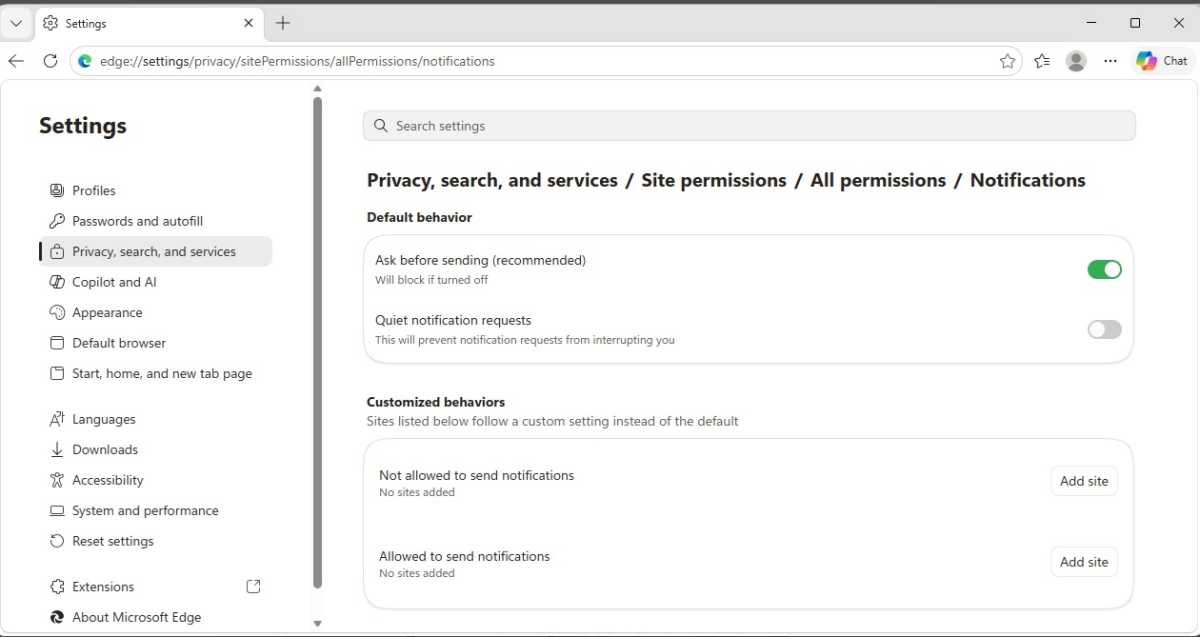
You can easily disable annoying notifications — or even the prompt for them — in modern browsers.
Foundry
No sooner have you landed on a news site or blog than the prompt
appears: “Do you want to allow notifications?” At the same time, videos
often start playing in the background without being asked — often with
sound, and right in the middle of the office or on the train.
This is annoying — and can even become a security issue. Browser notifications are now frequently misused for spam, dubious adverts, or fake competitions. That’s why it’s worth restricting this feature straight after installation.
Firefox:
Settings → Privacy & Security → Permissions → Notifications
There you can:
- Block new notification requests
- Remove existing permissions
- Permanently block annoying websites
Chrome:
Settings → Privacy and security → Site settings → Notifications
Recommended:
- Radical solution (no more requests): Under Default settings, select the option “Do not allow sites to send notifications”
- Gentle solution ( filter only annoying requests): Leave the tick next to “Websites can ask…,” but in the section below, select “Minimize unwanted requests (recommended)” or “Minimize all requests in the address bar.” This prevents the prompts from popping up annoyingly on the screen
Edge:
Settings → Privacy, search, and services → Site permissions → All permissions → Notifications
- Here you can enable “Quiet notification requests”
- You can find “Automatic media playback” in the previous menu item All permissions
2. Block ad trackers and third-party cookies
Foundry
Many users are familiar with the phenomenon: once you’ve searched for trainers, those shoes suddenly follow you all over the internet. This is down to tracking networks and third-party cookies, which create user profiles across multiple websites.
Firefox already offers relatively reliable protection by default. Chrome and Edge have much more lenient settings. This is precisely why you should tighten up tracking protection straight away.
Firefox:
Settings → Privacy & Security → Enhanced tracking protection
- We recommend selecting the “Strict” setting
This causes Firefox to block significantly more trackers, fingerprinting techniques, and suspicious scripts.
Chrome:
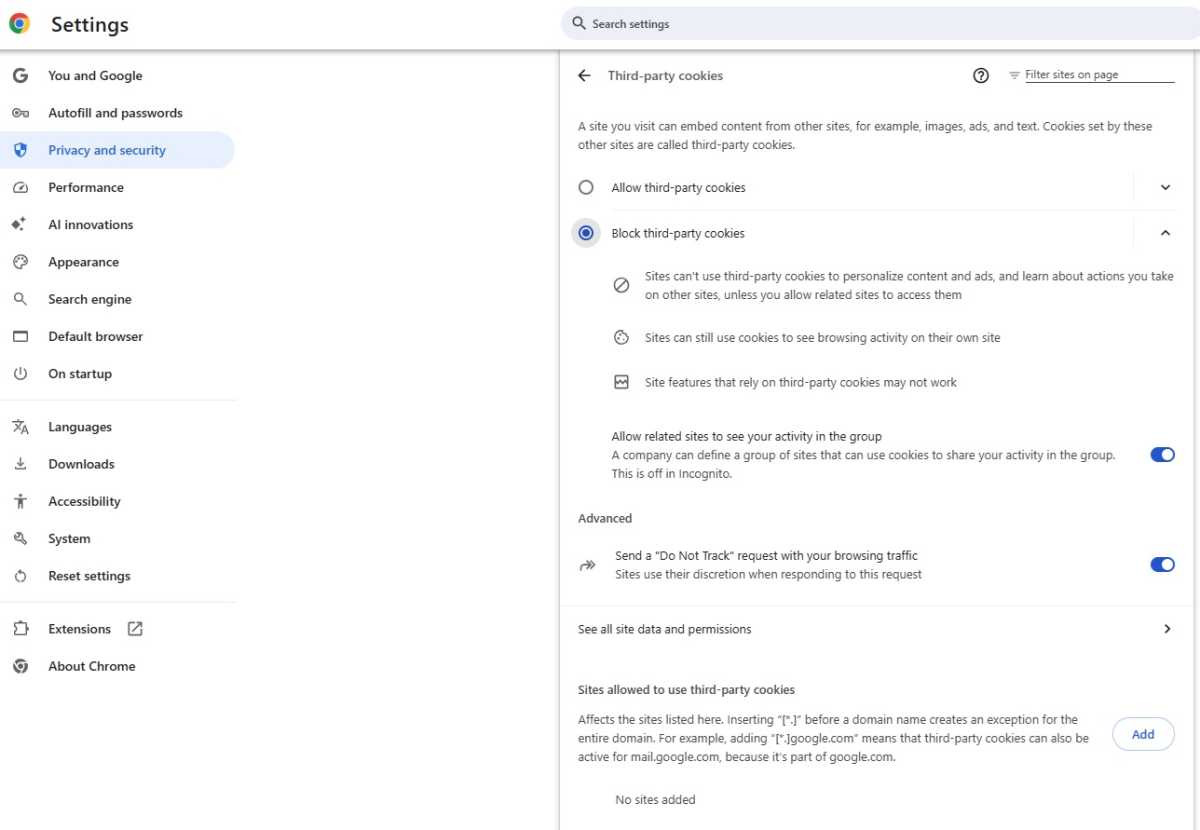
Settings → Privacy and security → Third-party cookies
Recommended:
- Block third-party cookies
- Disable the option “Allow related sites to see my activity in this group” (disables Google’s in-browser tracking)
Edge:
Settings → Privacy, search and services → Tracking prevention
Here, it’s worth setting this to at least “Balanced” or, even better, “Strict.”
This reduces personalized advertising and makes it harder for ad networks to track you.
⚠️ If you subsequently notice problems loading pages, lower the setting by one level.
3. Limit synchronization and telemetry
Foundry
As soon as you sign in with a Google, Microsoft,
or Firefox account, the browser starts synchronizing data such as your
history, open tabs, or passwords. This is handy, but with Chrome and
Edge it also means that large parts of your digital daily life end up
directly readable by the tech giants. If you don’t want this to happen,
you should restrict synchronization.
Good to know: Mozilla encrypts synchronization data in Firefox by default in such a way that even the manufacturer cannot read it. The focus here is more on telemetry.
Firefox:
Settings → Privacy & Security → Data collected by Firefox and how it is used
Recommendation:
- Uncheck the boxes next to the telemetry options here to stop the unsolicited flow of data to Mozilla. Synchronization itself is end-to-end encrypted in Firefox, but can also be adjusted under Settings → Synchronization if required
Chrome:
Settings → Google & me → Sync and Google services
Recommended:
- If you are not signed in (recommended): Do not sign in. Disable the following three data-hungry options here straight away:
- “Help improve Chrome’s features and performance” (stops automatic usage statistics being sent to Google)
- “Improve search and browsing” (prevents the URLs of the pages you visit from being sent to Google)
- “Advanced spell check” (otherwise, any text entered in the browser is sent to Google’s servers for checking)
- If you wish to sign in: Click on Sign in at the very top. Afterwards, be sure to select Customize sync to exclude sensitive data such as your browsing history from cloud storage
Edge:
Step 1 (Restrict profile data):
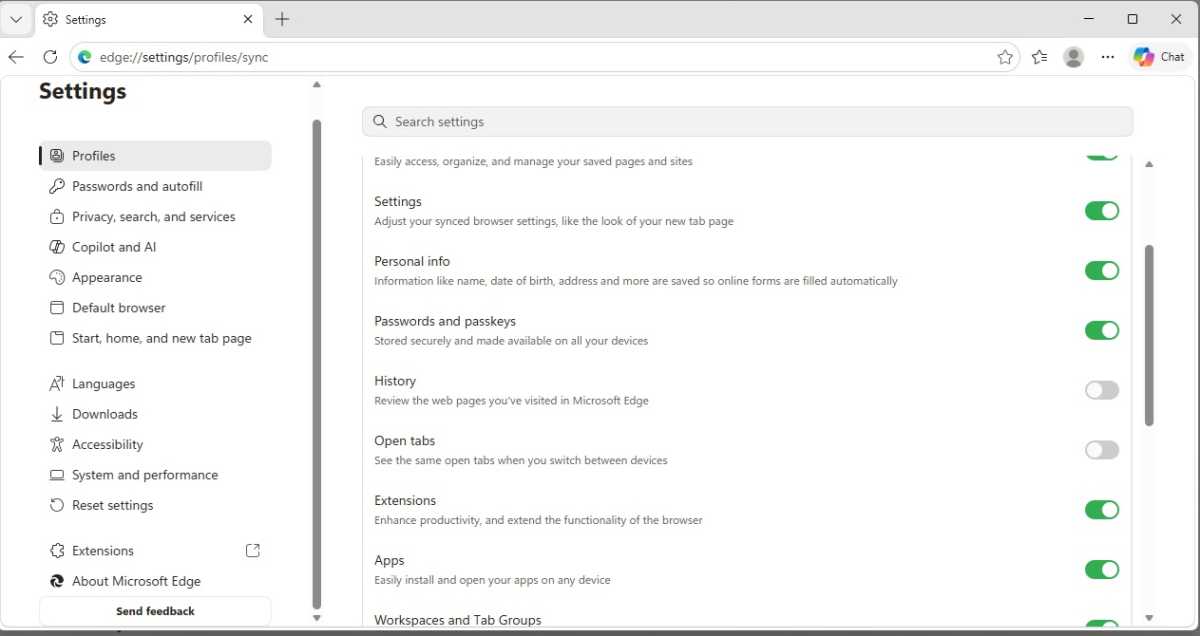
Settings → Profiles
- If you are not signed in: The Sync option is grayed out — so Microsoft is not collecting any cloud data here for the time being. However, at the very bottom, disable the option “Share browsing data with other Windows features” so that Edge does not share your browsing behavior with the entire Windows operating system without your consent
- If you are signed in: Click on Sync and deselect sensitive data such as history and open tabs
Step 2 (Disable privacy traps):
Settings → Privacy, search and services → Privacy
Here, specifically turn off the following three switches:
- “Help Microsoft improve its products by sending optional diagnostic data…” (otherwise, visited websites and app usage will be sent to Microsoft)
- “Help improve Microsoft products by sending results from web searches” (stops your web searches from being tracked)
- “Allow Microsoft to save your browsing activity… to personalize Microsoft Edge and Microsoft services…” (the biggest data trap: prevents Microsoft from analyzing your entire history and favorites for advertising and news)
4. Secure your password manager – or replace it
Foundry
You have to admit it: The built-in password managers in browsers
are convenient. That’s why the feature is popular, widely used, and
relied upon by millions of people. At the same time, however, stored
login details are among the most sensitive information there is — and
cyber threats lurk in many places today.
If, for example, unauthorized persons gain physical access to your computer or if you catch malware on your system, this can compromise your stored browser passwords in one fell swoop. That is why you should at least enable additional security features. Browser extensions are particularly tricky in this context, by the way; they are among the biggest data protection risks.
Firefox:
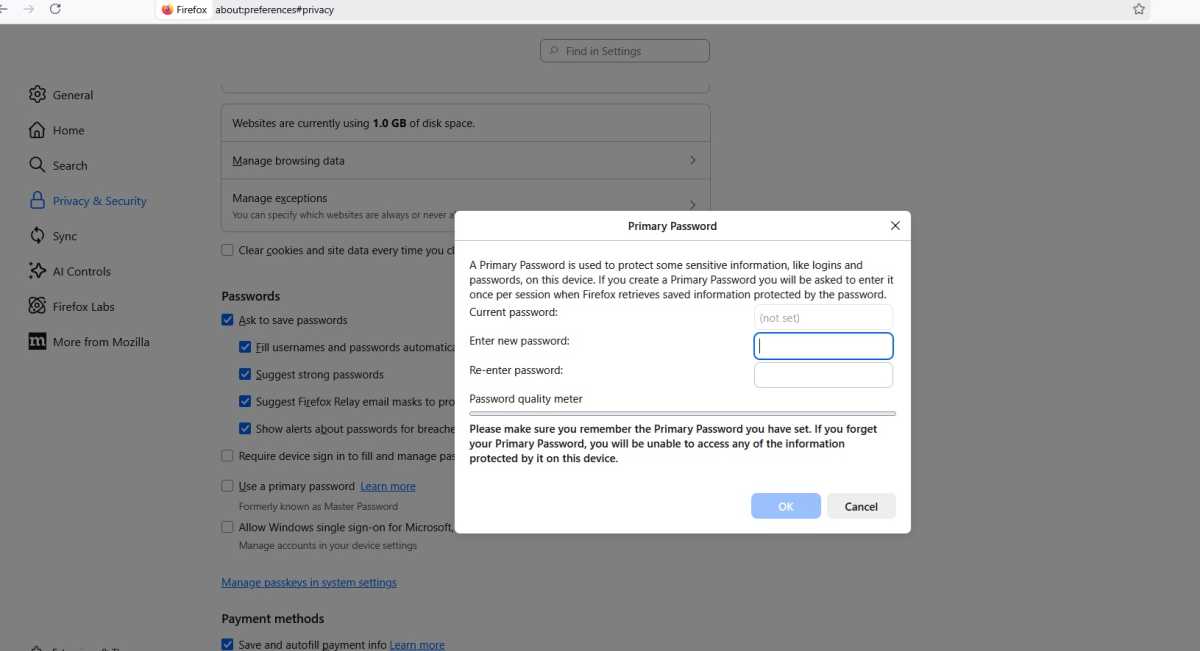
Settings → Privacy & Security → Scroll down to the ‘Passwords’ section
Be sure to enable one of the two security features here so that no one can use your logins without authorization:
- Recommendation (Convenient & Secure): Tick the box next to “Require device login to fill in and manage passwords.” Firefox will then ask for your Windows PIN, Mac passcode, or fingerprint before a password is entered
- Alternative (separate protection): Instead, enable “Use a primary password” (formerly known as the master password). Here, you set your own new password, which you must enter once every time you start Firefox to unlock the password vault
Chrome:
Settings → Autofill and passwords
Proceed as follows:
- Step 1 (Enable password protection): Click on “Google Password Manager” (opens in a new tab). In the left-hand menu, go to Settings and toggle the switch for “Use Windows Hello when filling in passwords.” From now on, Chrome will ask for your Windows PIN or fingerprint before automatically filling in passwords
- Step 2 (Disable privacy trap): Go back to the previous browser tab for Autofill and Passwords. Scroll down to “AutoFill settings” and disable “Advanced AutoFill.” This prevents Chrome from sending the URLs and content of form pages to Google servers.
Edge:
Settings → Passwords and Autofill → Microsoft Password Manager → Advanced settings
Here, we recommend:
- Be sure to enable the option “Ask for device sign-in options before showing or filling in the website access code”
Tip for maximum security: In the drop-down menu below, select whether Edge should always, or at least once per browser session, ask for your Windows PIN or fingerprint. Without this protection, your passwords are freely visible to anyone sitting at your PC.
Many power users opt instead for specialized password managers such as Bitwarden or 1Password, which offer additional security features and independent encryption. We strongly recommend using a modern password manager. Here we compare the best ones.
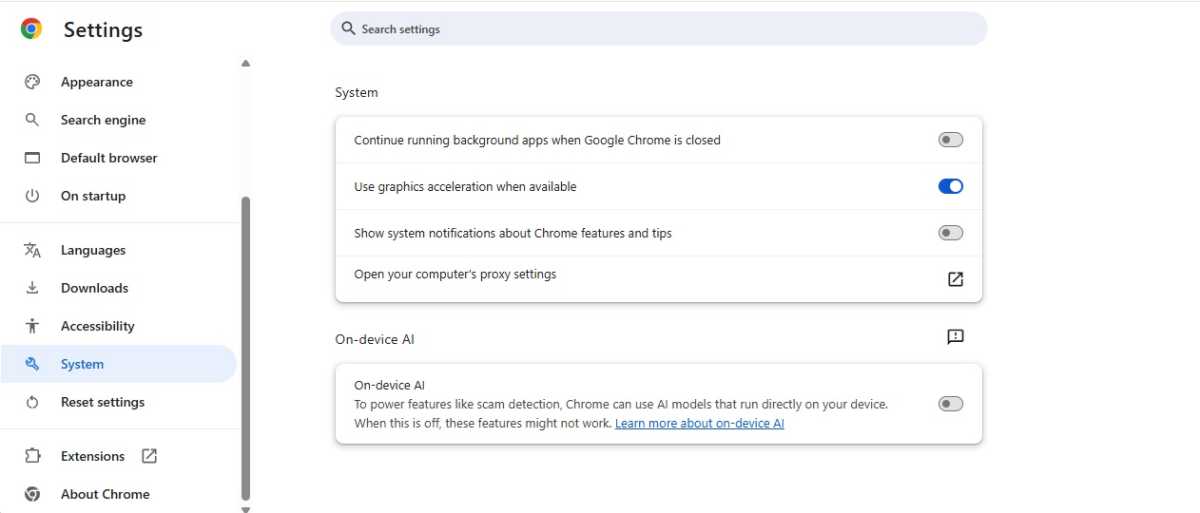
5. Disable background processes and Startup Boost
Foundry
Many users close their browser and later wonder why their RAM
usage is high or their battery life is dwindling. The reason: Chrome and
Edge often continue to run secretly in the background, even when not a
single browser window is open. Whilst this provides minimal speed
benefits at startup the next time you click, it constantly drains system
performance and your laptop’s battery.
Firefox users can skip this section: the open-source browser behaves impeccably in this regard and usually closes itself completely as soon as the last window is closed. With the competition, however, you’ll need to take a few steps:
Chrome:
Settings → System
Important option:
- Disable “Continue running apps in the background when Google Chrome is closed”
Edge:
Settings → System and performance → System
There, you should disable:
- “Startup Boost”
- “Continue running background extensions and apps when Edge is closed”
Pro tip: The modern successor to ‘Do Not Track’ is called ‘Global Privacy Control’
The classic “Do Not Track” (DNT) signal, which can still be enabled in many browsers, is now largely considered ineffective. Because it was never legally binding for website operators, advertising giants such as Google or Meta simply ignore the request.
The Global Privacy Control (GPC) signal is now more effective and carries significantly greater weight under data protection law. It is the modern, legally binding successor. If a website detects this signal, it must restrict tracking on the server side — depending on the region (as under the GDPR in Europe).
- Firefox: Has supported GPC natively since version 121. As soon as you set Enhanced Tracking Protection to “Strict” (see step 2), Firefox automatically sends the GPC signal to every website.
- Chrome & Edge: Unfortunately, they do not yet offer full native support for this feature. In this case, installing a privacy-friendly extension such as Privacy Badger (from the EFF), which sends the GPC signal whilst you browse, can help.
Privacy out of the box: How the browsers differ
| Browser | Built-in privacy | Recommended settings | Effort |
| Mozilla Firefox | Strong | Enable “Strict” tracking protection, restrict telemetry & synchronization. | Approx. 2 minutes |
| Google Chrome | Weak | Block third-party cookies, disable Google advertising profiles & background apps. Install Privacy Badger. | approx. 5 minutes |
| Microsoft Edge | Medium | Select “Strict” tracking protection, disable diagnostic data & Startup Boost. Install Privacy Badger. | Approx. 5 minutes |
Tip: Although Firefox has the edge when it comes to privacy out of the box, the same applies here: An additional ad and tracking blocker such as Privacy Badger is a useful addition. The tool specifically blocks intrusive tracking scripts running in the background without preventing the loading of desired content across the board. This protects your privacy and conserves resources while browsing.
Conclusion
Browsers today are much more than just programs for surfing the web. They store passwords, synchronize personal data, and constantly communicate with cloud services.
That’s exactly why it’s worth doing a quick settings check straight after installation. With just a few clicks, you can reduce tracking, save resources, and make Chrome, Edge, or Firefox significantly safer and more private in everyday use.
Related content
This article originally appeared on our sister publication PC-WELT and was translated and localized from German.
