Pages

March 26, 2019

Firefox Send: Share Files Up To 2.5GB

There is no dearth of free file sharing services. In fact, there are hundreds of cloud storage and file sharing services around. OneDrive, Google Drive, Dropbox, and iCloud Drive are the popular file storage and sharing services out there.

Firefox Send

Firefox Send pic1
Firefox Send is a new free file sharing service from Mozilla. Like most other file sharing services out there, you don’t need to install an app (in fact, there is no app) to begin sharing files. Besides that, you don’t need to create an account or sign in to Mozilla account to share or download a file under 1GB size.

Firefox Send features

As of now, Firefox Send allows sharing files up to 1GB without signing in to the service. If you have a Mozilla/Firefox account or willing to create one, you can share files up to 2.5GB at a time. Unlike many file-sharing services out there, Firefox Send lets you share files with end-to-end encryption which means that you can keep your files private. The shared link can be configured to expire after x number of downloads or x number of days.
A shared file can be downloaded for a maximum of 100 times or 7 days, whichever is earlier. Of course, you can configure the link to expire after 1, 2, 3, 4, 5, 20, 50, or 100 downloads.
Firefox Send pic3
When you select a file to upload, you will be offered options to set the expiry and password (optional) for the file.
The catch with the sign in free upload is that a file uploaded without signing will expire after one download or in a day. Likewise, if you want to keep the hosted file’s link active for more than one day (supports a maximum of 7 days), you will need to sign in to the free service.
Firefox Send pic2
By signing in to the free Firefox Send, you can share files up to 2.5GB, share files with more people (up to 100 downloads), keep the file hosted for up to 7 days, and manage shared files from your account.
Overall, Firefox Send is a fantastic service from Mozilla. Given the fact that it allows you encrypt and share files up to 2.5 GB, it’s the best free file sharing service from a trusted developer.
Firefox Send is also pretty good in the privacy department. According to the privacy page on Firefox Send, Mozilla receives an encrypted copy of the file that you upload, and it cannot access the file content or name of the file. Files are stored on Mozilla servers for a maximum of 1 day or 7 days, depending on how long you would like to store/share an uploaded file.
If you are wondering, no, you don’t need to have installed Mozilla Firefox to upload or download files to and from Firefox Send service.
Once a file is uploaded, you will get a link which you can share with anyone to let them download the file. The link will automatically expire once it reaches specified time or download limit.
Firefox Send pic6
If you have set a password while uploading a file to Firefox Send, you will have to enter the password to download it. In fact, one cannot see the name of the file without entering the password.
Firefox Send pic7
It’s worth noting that your browser’s memory usage might go up by at least the size of the file that you are uploading. That is, when you are uploading a file of 2GB, you can expect your web browser to use around 2GB of memory. The reason is, Firefox Send encrypts and decrypts files in the browser.
Visit the following link to begin sharing files with Firefox Send.
Firefox Send


Source: https://www.intowindows.com/firefox-send-share-files-up-to-2-5gb/

March 25, 2019

This is the Chromium-based Microsoft Edge browser

Microsoft revealed plans in December 2018 to use Chromium as the core for the company's Microsoft Edge web browser instead of the company's own engine.
Chromium is used by Google Chrome, Opera, Vivaldi, Brave, and several other web browsers. Some saw the decision as a long overdue move to improve the default browser on Windows, others as another step towards a Chromium monopoly on the web.
Firefox and Internet Explorer, Microsoft's second web browser that is not really in development anymore, are the two only browsers left standing that use a different engine on Windows after Microsoft completes the move.
A version of the Chromium-based Microsoft Edge web browser leaked to the public recently. The download has a size of 112 Megabytes and it is recommended to test it in a sandbox or virtual machine as it comes from an unofficial source.
Note that the browser is still in active development; some things may change and features that are missing may be added before the first stable version release later this year.
The new Edge and the old Edge run side by side. I tested this only on a Windows 10 machine; the new Edge will run on Windows 7 SP1 or Windows 8.1 systems as well according to Microsoft. Whether that is the case for this build is unclear.

The Chromium-based Microsoft Edge browser

microsoft edge chromium
The browser interface looks very similar to that of other Chromium-based browsers; this should not come as a surprise as all browsers use the same core.
The browser picks up the logged in Microsoft Account of the Windows system and displays the account icon in the interface automatically.
The menu looks like a mix of Chrome's main menu and that of Microsoft Edge. Most options look identical to those offered by Chrome but you find Microsoft's handwriting in some entries. The Read Aloud option is already available and incognito mode is called inPrivate mode.
The Edge main menu is gone in this build which is a good thing in my opinion as I never got used to it. Settings do look different in Microsoft Edge than in Chromium.
microsoft edge settings
A couple of things are still missing in Settings. There is no Themes option or option to change the search engine, but most Chromium Settings are already available.
Update: you can edit search engines by going to edge://settings/searchEngines.
Microsoft integrated Windows Defender SmartScreen in the browser natively.
The extensions link works already and redirects to the Microsoft Store. There you may install a few dozen extensions optimized for the Microsoft Edge version of Chromium already.
Extensions include AdBlock Plus, Amazon Assistant, Boomerang for Gmail, Dashlane, Enhancer for YouTube, LastPass, Save to Pocket, or uBlock Origin.
Installations work directly; it is no longer necessary to install browser extensions for Edge from within the Microsoft Store app.
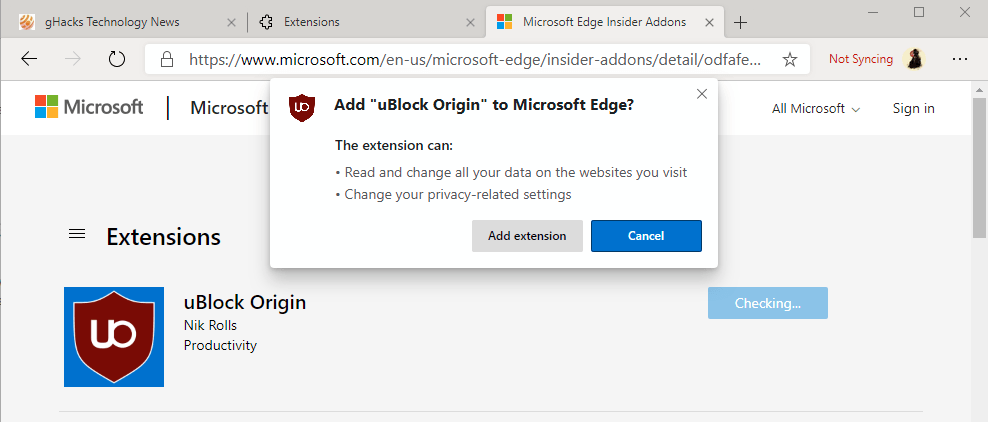
install extensions edge
Edge displays the extension installation dialog directly in the browser window. The prompt lists permission requests and options to install the extension or cancel the process.
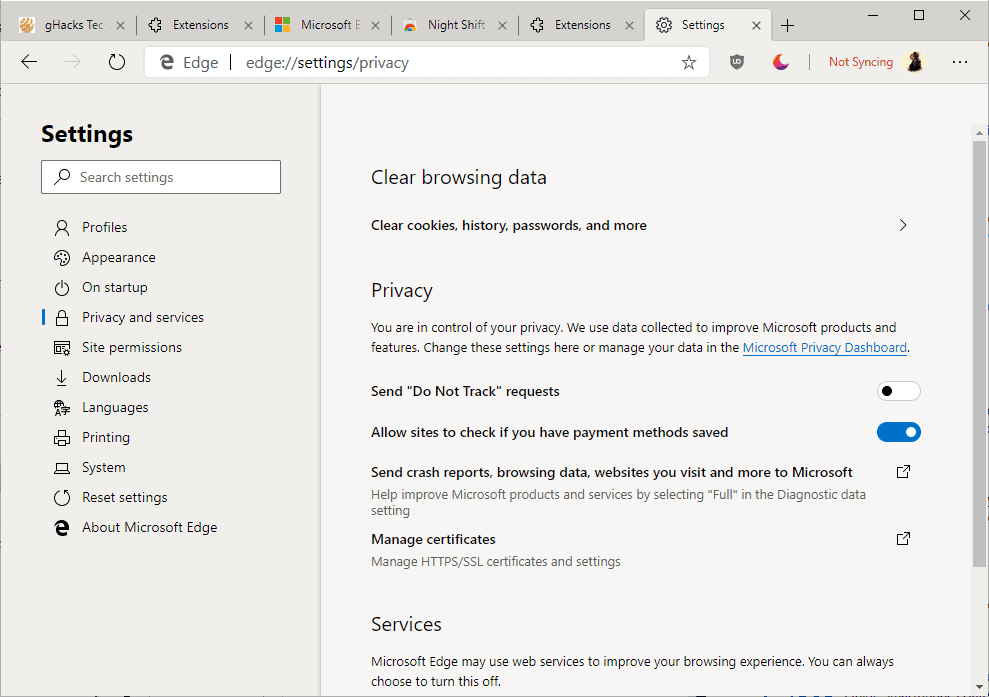
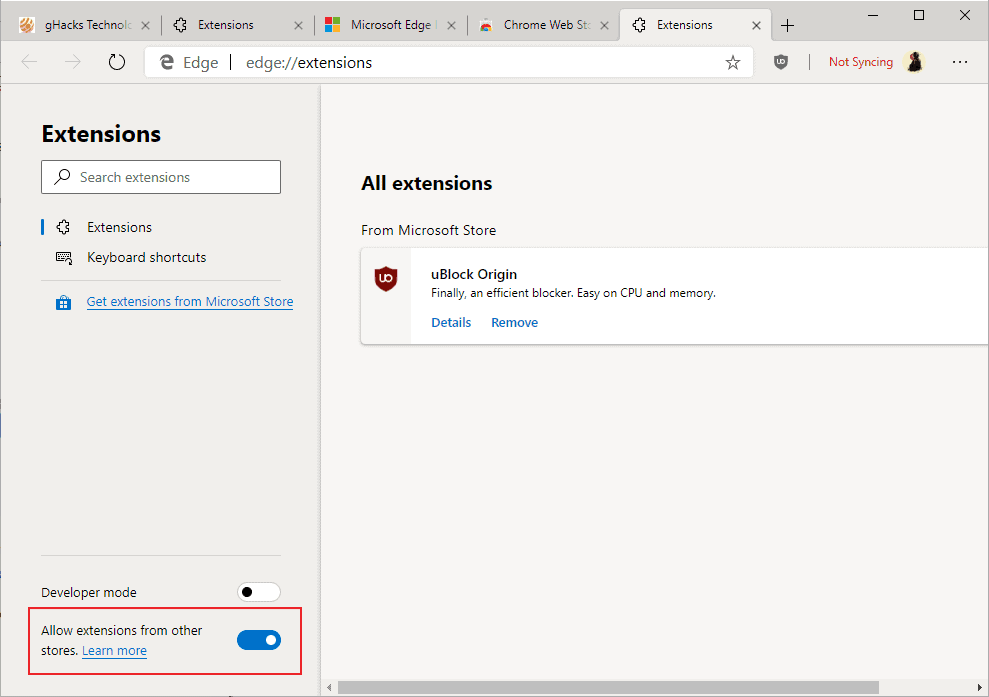
The extensions management page lists options to enable the Developer Mode and to allow extensions from other stores. Microsoft Edge displays a notification to users that this is an option when the Chrome Web Store is visited (but not Mozilla AMO).
microsoft edge chromium extensions chrome
You can install extensions from the Chrome Web Store after you make the change on edge://extensions.
The option removes a severe limitation as Edge users could only select from a hundred or so extensions previously. Support for Chrome extensions gives users more options and improved functionality.

Closing Words

The new Chromium-based Microsoft Edge browser does away with several of the annoyances of the old Edge browser. Better web standards support and support for Chrome extensions are certainly features that make the new Edge more attractive. Whether that is enough to convince users to stick with the browser remains to be seen.
The first impression is good. Microsoft Edge is fast to open, websites load quickly, and you can install extensions from the Chrome Web Store. Some settings and options are still missing but development is ongoing. It is possible that these will be introduced in a future version.
Now You: What's your take on this initial Chromium-based version of Microsoft Edge? (via Caschy)

Source: https://www.ghacks.net/2019/03/25/this-is-the-chromium-based-microsoft-edge-browser/

December 7, 2018

Microsoft confirms that Edge will switch to Chromium

Microsoft confirmed today that the company's Microsoft Edge web browser will "move to a Chromium-compatible web platform" on the desktop.
Rumors emerged last week that Microsoft was done with developing and maintaining its own rendering engine and that the company would either move Edge to a Chromium-based core or create a new browser based on that.
Today's article on the Windows Experience blog confirms the rumor. Microsoft Edge won't die but it will be moved from its own platform to Chromium to become a Chromium-based browser.
Google Chrome is the dominating Chromium-based browser but there are others such as Vivaldi or Opera.
microsoft edge
Interesting from the perspective of a Windows user is that the new Edge won't be Windows 10 exclusive anymore. Microsoft plans to release Microsoft Edge, the new version that is based on Chromium, for all supported versions of Windows. There is also a possibility that Microsoft Edge will be launched for Mac OS X or other platforms in the future.
Edge will be updated more frequently; that means, likely, that Microsoft won't include Microsoft Edge updates with updates for the Windows operating system anymore.
Microsoft Edge will evolve according to Microsoft.
[..] we will evolve the browser code more broadly, so that our distribution model offers an updated Microsoft Edge experience + platform across all supported versions of Windows, while still maintaining the benefits of the browser’s close integration with Windows.
Microsoft plans to contribute to the Chromium project to improve the platform further. Edge users will benefit from improved compatibility when using the web browser.
Microsoft invites developers to join Microsoft Edge Insider to test preview builds of the new Edge when they become available.
Just visit the Microsoft Edge Insider website and sign up there to receive information about upcoming builds. Microsoft expects to have a first preview build ready in early 2019; this suggests that Microsoft started work on migrating Edge to the new code-base for some time already.

Closing Words

I never understood why Edge was not available for other supported Windows versions; it felt like a huge oversight on Microsoft's part. The moving to a Chromium-base changes that and that is a good thing. Whether the move will convince many Windows 7 and 8.1 users to switch to Edge remains to be seen; my initial guess is that some will try Edge when it first comes out but won't probably switch to it unless it offers something spectacular that other Chromium-based browsers don't offer.
Lots of questions remain unanswered: will there be feature changes? what about Edge's interface and design?
Microsoft has some things to sort out as well. Universal Windows Platform uses EdgeHTML and the team needs to find a way to move all of that to Chromium as well.

Source: https://www.ghacks.net/2018/12/06/microsoft-confirms-that-edge-will-use-chromium/

November 18, 2018

How to restore the old Google Chrome design

Google started to roll out Google Chrome 69 Stable to all supported systems yesterday. The new version of the web browser arrived in time for the browser's 10 year anniversary.
While Google's release notes are usually short and not very descriptive when it comes to new features or changes, it is different this time around thanks to the anniversary.
The company published an article on the official Chrome blog, Chrome's turning 10, here's what's new, in which it highlighted some of the changes in the new version.
Chrome 69 is one of the few releases of the browser that makes modifications to the user interface.
First up, Chrome has a new look. You can see it across all platforms—desktop, Android, and iOS—where you’ll notice more rounded shapes, new icons and a new color palette.
Tabs changed on the desktop to highlight website icons more.
We changed the shape of our tabs so that the website icons are easier to see, which makes it easier to navigate across lots of tabs.
Chrome users who upgrade to Chrome 69 will notice the interface changes right away. The edges of tabs are rounded in Chrome 69, the profile icon was moved from the title bar to the main toolbar, and the height of the titlebar has been reduced even further in the new version.


Chrome 69: the new design

chrome 69 default layout new


The screenshot that you see above depicts the new default design of the Google Chrome web browser on desktop operating systems. The screenshot was captured on a Windows 10 machine and the layout and design may look slightly different on other operating systems.
The screenshot below depicts the old design of the user interface.


chrome 69 old layout


It is possible, currently, to restore the old user interface in Chrome. The option to do so is powered by an experimental flag; these flags may be changed or removed at any time and it is unclear for how long Chrome users will have the option to restore the old UI layout.
Here is what you need to do:
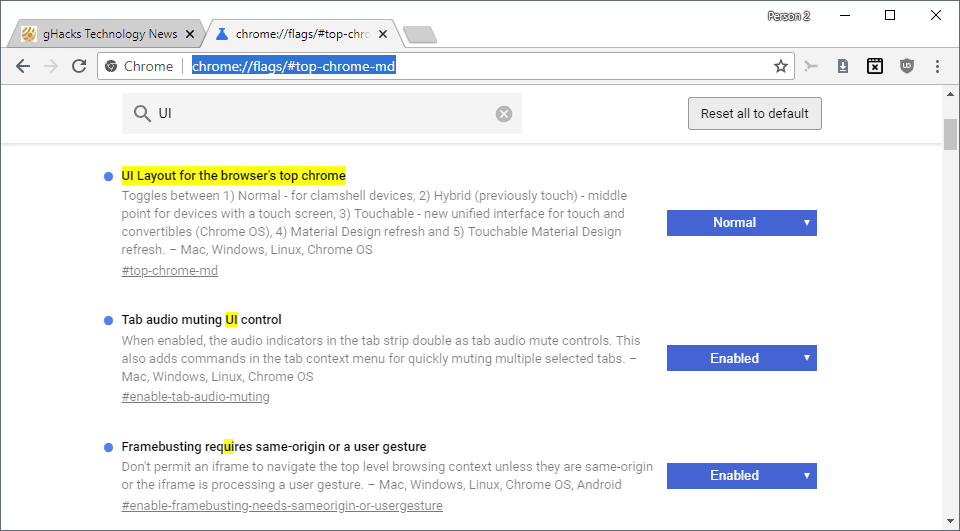
  1. Load chrome://flags/#top-chrome-md in the browser's address bar.  The flag is still available if the experiment UI Layout for the browser's top chrome is returned as the first result on the page that is loaded.
  2. Activate the menu next to the flag and set it to Normal.
  3. Restart the Chrome browser.


Note
: You can experiment with other UI layout options, e.g. touchable or hybrid to pick the one that works best for you. Just remember that these options may be removed by Google at any time.
  • Normal - for clamshell devices
  • Hybrid (previously touch) middle point for devices with a touch screen
  • Auto, unclear, likely automatic selection.
  • Touchable - new unified interface for touch and convertibles (Chrome OS)
  • Material Design refresh
  • Touchable Material Design refresh.


Source: https://www.ghacks.net/2018/09/05/how-to-restore-the-old-google-chrome-design/

November 12, 2018

The Best Job Search Engines


Finding a new job is a challenge—the right company, the right position, the right pay. These job search engines will make the process of finding your next job easier and faster.

Monster.com

monster-job-search-site-header
Monster.com was one of the first job search engines on the internet. While it may not be the undisputed champion of job search today, it still is relevant and popular with job seekers and employers. You can search for a job you like using the job title or relevant keywords, or use the extensive filters to shortlist available jobs.
Apart from just job listing, Monster.com also has a few add-on services that will help your profile get noticed by potential employers. These services include professional resume writing, resume highlighter, and a job-search expediter. Monster.com is free for job seekers, and employers pay a nominal fee to have access to a large pool of potential employees.

LinkedIn

linkedin-job-search-site-header
LinkedIn is a unique job search engine as it combines the power of professional social networking with job searching. While LinkedIn has a dedicated job portal on its website, it’s estimated that most of the jobs found on LinkedIn are through networking. Even LinkedIn’s research concluded that close to 67% of jobs are found through personal recommendations. Considering that, LinkedIn is a great place not only to find jobs but also to connect with people in the industry in which you work.

Glassdoor

glassdoor-job-search-sites-header
Glassdoor is another popular job search engine with a different approach to job hunting. When you search for a job on Glassdoor.com, you’ll get all the basic information about each job that interests you. You can manage your job-hunting better with useful features like searching, filtering, tracking, and so on.
What sets Glassdoor.com apart is that also hosts a plethora of user-generated information about companies. This information includes company reviews, interview questions, salary reports, and more. This information can give you the edge when you’re looking for the perfect organization.

SimplyHired

simplyhired-job-search-sites-header
Simplyhired is a popular job aggregator with millions of jobs listed on the website. You start by entering a few keywords about the job you’re looking for and hitting search. You can then select your desired jobs from the jobs that appear and apply for them. Since SimplyHired is a job aggregator and not a job board, you’ll be taken to the employer’s website or another portal where you’ll be able to submit your resume or other documents as needed for the recruitment process.

AngelList

angellist-trending-searches
AngelList is a fantastic job search site if you’re looking to get hired by startups or fast-growing tech companies. Unlike other sites, you can’t see all the open jobs on AngelList without creating an account. Once you do create your account, you can see all the jobs, upload your resume, and start applying. The interesting thing about AngelList is that all the job listings are posted by the companies themselves, and you can see your potential salary, equity, and stock options upfront—even before applying to the job.

Dice.com

dice-job-search-engine-header
Other websites on this list help you find all sorts of jobs, but, Dice.com is different. It’s a job search portal only for tech jobs. You can search using keywords, job titles, company name, or using the trending jobs section.
But, if you’re in the tech business, the specificity of jobs is what makes Dice.com different from other job search websites. If you create an account (for free), you can also upload your resume on the site. Having an account also lets you get salary information and track jobs for which you’ve applied.

Google for Jobs

If you’ve searched for jobs on Google, you might have noticed that Google displays relevant jobs in a rich-snippet search result.
google-job-search-engine
If you click the “100+ more jobs” link, you’ll reach Google’s job search portal. The portal doesn’t have an official name, but it acts like a job search engine. The jobs there are aggregated from multiple websites, which saves time on job-hunting. There are plenty of filters to search for the job you prefer, and you can bookmark individual jobs for later viewing. You can also set an alert for a particular job search that you perform and receive email alerts when similar jobs are posted.
google-job-search-complete-list


Source: https://www.howtogeek.com/393716/the-best-job-search-engines/

November 3, 2018

Top 5 Unbiased World News Websites Free From Censorship

This is a world where money seems to have such control over journalistic integrity. Is there no place for the reader to turn for unbiased news? The short answer is an emphatic yes.
There’s still hope.
When it comes to “censorship”, news can be censored either by the over-reach of government entities or by a corporate stranglehold on the editorial processes of news organizations.

What Is Unbiased News?

It could be an angle placed on news stories about state organizations or policies that are financed by state leadership themselves. There is no better example of this than the Xinhua News Agency, the mouthpiece of the Peoples Republic of China. Or Telegraph Agency of the Soviet Union (TASS), the news agency owned by the Russian government.
However, the US isn’t innocent either. In the US, those controlling the journalists’ pens are corporate leaders rather than government leaders.
In the US, there are six corporate media giants that own 90 percent of the US media market—GE, News-Corp, Disney, Viacom, Time Warner, and CBS.


newspapers


It would be naive of anyone to believe that the people writing the paychecks for those reporting the news don’t hold some sway over what news gets reported, and how it gets reported.
This is especially apparent during every US Presidential election. Media corporate owners contribute significant campaign contributions to their favored candidates on one hand. On the other hand, they published news stories with a positive spin for their own favored candidate. CNN, Fox News, MSNBC, The New Yorker, and The Blaze are just a few examples.

So are there still any unbiased news sources? Thankfully, there are.

1. The Associated Press


associated press news


The Associated Press was founded in 1846 and remains a renowned global news organization with 52 Pulitzer Prizes under its belt. It is and has always been the epitome of clear and unbiased news journalism and reporting. It is actually where most journalists seek out their own news stories to report on.
John Daniszewski for the AP wrote a piece about fake news on social media titled “Getting the facts right.” He cited a memo sent out to AP staff by Social Media Editor Eric Carvin where Eric wrote:
“The language we use: Whenever possible, we want to emphasize specifics rather than generalizations or labels. Let’s say what we know to be true and what is false, based on our reporting.”
This is the very definition of unbiased news.
The AP doesn’t only paint rainbows for one side on any story while drawing storm clouds for the other. The language used in each report is neutral, and the focus is only on reporting the news.


2. Wall Street Journal


wall street journal


Wall Street Journal is well known for reporting the news as it is. It serves a healthy dose of reality from both sides of the political spectrum.
It isn’t likely you’ll see a Wall Street Journal White House correspondent trading blows with the President in the Press Room.
The reason for this isn’t because WSJ loves our current president. It’s because you won’t often find antagonistic stories on the front page that are lambasting either side.
They explain what’s happening, who’s doing it and why, without excessive editorializing or using emotion-ridden writing.
WSJ journalists tell it like it is, without letting their own biases (or the biases of the corporate ownership) filter down into the story.
This isn’t an easy thing to accomplish with any news organization.
A contrast to this can be made with Fox News, the bastion of Conservative news reporting.


fox news


This isn’t just political bias in the media. Other sites that lack journalistic integrity like this are usually overtly nationalistic (overly pro-American — posting negative news headlines about other countries), or blatantly anti-American (like British news sources that produce a fresh batch of anti-gun editorials in response to every major shooting event that happens in the US—the Guardian is guilty of this quite often).
If you become a reader of the Wall Street Journal, you’ll find yourself more often better-informed, and less often offended or annoyed by the journalist’s choice of words.

3. Google News


google news


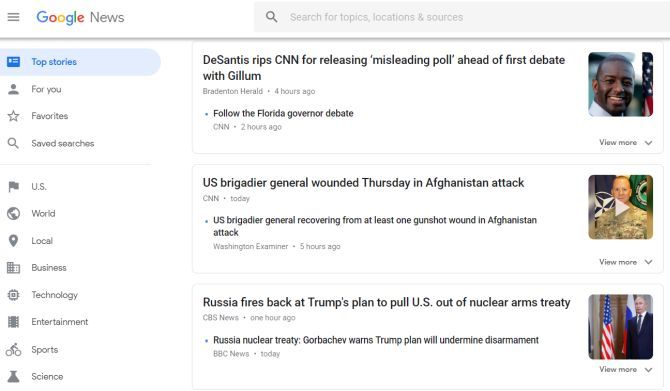
Google News isn’t so much a news organization as it is a collection of news sources generated at least partially by a news-gathering algorithm, similar to how Google runs its flagship search engine.

It is partially managed by human editors as well, but the reason Google News is listed here not because the headlines are especially unbiased. It’s listed because of how little human intervention there is in developing front page headlines.
This usually results in a listing of headlines that may not be entirely free from left or right leaning headlines. But you’ll at least discover a healthy mix of each side.
If you believe that no single news organization can be completely free of intrinsic bias, then Google News gives you a place where you can at least see the news reported from the entire spectrum. That’s a great way to get the whole picture, no matter what the news event may be.

4. BBC


bbc news


If you want to know what’s going on in the world, the BBC is the place to go. You will find better information than the same stories at a US news site.
It may seem ironic that US news organizations appear far more censored and filled with pro-government propaganda than British news organizations.
These days, US foreign policy includes so much government cooperation with corporate US news media. So, the only alternative for Americans (or anyone for that matter), is to turn to foreign news sources for the whole story.
Maybe (hopefully) this will change for the better, but for now this is the only option many Americans have.

5. Reuters


reuters


The news organization Reuters deserves honorable mention on this list for the same reasons as the BBC and more. News events on this site are written with some of the most straightforward reporting seen anywhere.
World stories on controversial hot-topics like the Israeli-Palestinian conflict, Brexit, or various government elections, don’t appear to take one side or another. Headlines cover insights from every end of the spectrum.
This is especially refreshing at a time when this kind of journalistic, unbiased news reporting is so rare.
If you want to bookmark only one news website, you should bookmark this one. You will get a fair and balanced perspective on all important matters in the world today.

Other Unbiased News Sources Worth Mentioning

There are a few additional news organizations in the world today that deserve mention. They were not included in the list above because sometimes these sites occasionally let their author’s biases get published.
C-Span and Pew Research aren’t specifically news organizations. But they deserve mention as fantastic resources to learn the deeper truth behind today’s news stories.
  • Al JazeeraAl Jazeera is based out of Qatar. Qatar is quite different from America, where “freedom of the press” is sacrosanct. However, Al Jazeera remains impartial and fact-based regardless. It’s surprising that many Americans prefer an Arabic news source above American ones. That’s the reality of the world today.
  • C-Span: Watch government hearings and other events on your own, instead of relying on second-hand reporting. Keep your TV tuned to C-Span. You’ll actually be shocked to discover just how much those second-hand journalists twist what was actually said at those hearings. So why depend on those faulty reports when you can see for yourself?
  • NPR: NPR would have landed in the primary list of unbiased news sources above, but its coverage sometimes leans a little too far to the left. However, in the majority of cases, NPR reporting is about as impartial and factual as you could ask for from a US-based news organization.
  • Christian Science Monitor: Despite a name that would make you expect it to be a bastion of Conservative news reporting like The Blaze, CSMonitor is actually a refreshingly honest and impartial news source. You’ll find stories here that attack or support government policies from both sides of the aisle.
  • Pew Research: Interested in the facts, and only the facts? You can’t go wrong bookmarking Pew Research. Even during heated election years, you’ll find the polls, surveys, and research conducted by this organization to be accurate and truthful. It is self-described as a “nonpartisan fact tank”, and that’s exactly what it is. Don’t get your facts from Facebook. Look to Pew Research to get accurate facts before you make up your mind.

What Bias Really Means

These days, you’ll find anyone who disagrees with a news story angle calling it “biased.” Conservatives hate CNN and MSNBC. Liberals hate Fox News and The Blaze. Everyone in the middle hates them all. So how can you really call any news organization “unbiased”, when so often bias itself is subjective?
Every journalist is aware of the nine principles of journalism. The first says that a journalist’s first obligation is to the truth.
“This ‘journalistic truth’ is a process that begins with the professional discipline of assembling and verifying facts. Then journalists try to convey a fair and reliable account of their meaning, valid for now, subject to further investigation.”
The ability to set aside one’s own prejudices in order to be “neutral” is not a part of those principles. However, “the source of their credibility is still their accuracy, intellectual fairness, and ability to inform.” When journalists let personal biases hinder their objectivity, it puts the entire media organization at risk. Thankfully there are still enough media outlets left that uphold these principles.
If you’re into tech news, there are some great tech news sources to check out as well.

Source: https://www.makeuseof.com/tag/top-5-world-news-websites-guaranteed-free-censorship/


October 31, 2018

Why You Shouldn’t Use (Most) Alternative Browsers Based on Google Chrome

Google Chrome is based on Chromium, an open-source browser project. Anyone can take the Chromium source code and use it to build their own browser, renaming it and changing whatever they like. That’s why there are so many alternative browsers based on Google Chrome—but you don’t necessarily want to use most of them.
Many web sites have recommended these browsers in the past—including us, in this very post. We’ve since rewritten this article to discuss the problems with some of these alternative browsers, and why we no longer recommend using them—with a few exceptions.

The “Secure” Comodo Dragon Had Big Security Problems

Comodo Dragon is a Chrome-based browser made by Comodo, a security company. It’s installed by default with Comodo Internet Security.
You’d think a “secure” web browser made by a security software company would be…well, secure, but it’s had some big problems. Google’s Tavis Ormandy found that the browser shipped with a serious problem that destroyed the security of HTTPS encryption. As he put it: “Chromodo is described as ‘highest levels of speed, security and privacy’, but actually disables all web security.”
Comodo responded by issuing a fix that didn’t actually fix the problem. Comodo did fix it eventually, but that doesn’t change the fact that such a glaring security problem shipped with the browser. Companies like Google, Mozilla, Microsoft, and Apple have never made such a big mistake in their products. Comodo doesn’t sound like a company we’d want to get our web browser from.

SRWare Iron’s Privacy Claims Are Exaggerated, and It’s Slow to Update

SRWare Iron promises to remove various privacy-infringing options from Google Chrome. But it isn’t as good as it sounds.
Right off the bat, there’s something we don’t like: On March 17, 2017, the latest version of SRWare Iron was version 56.0.2950.1. The latest version of Chrome was version 57.0.2987.110, released on March 16. That means SRWare Iron was missing more than 36 security fixes that Chrome had for over a week.
That’s because SRWare Iron’s developers have to do some work to release those security fixes whenever Google releases a new version of Chrome. It’s not instant, and these third-party projects may take a long time to issue updates if their developers are busy.
But here’s the real kicker: you aren’t really getting any extra privacy out of SRWare Iron. Most of what SRWare Iron does is possible through Chrome’s regular privacy settings. And if you enable those tweaks in Chrome, you’ll get the latest security updates without waiting for and trusting another company.

Chromium Isn’t For Users (Except on Linux)

Google doesn’t want you using the open-source Chromium browser. That’s why the Chromium project only offers “raw builds” of Chromium code that “may be tremendously buggy” for Windows. They also don’t include an auto-update feature, so you have to manually download new versions with security and bug fixes. These Chromium builds are really just development tools for checking whether issues are fixed in the latest Chromium code. Stay away.
Chromium’s main difference is that it’s entirely open-source, while Google Chrome includes a few closed-source pieces (like Flash). That’s why Chromium is often made available via the package repositories on Linux distributions. A Chromium browser obtained from your Linux package repositories should be safe and receive regular security updates from your Linux distribution. But Windows and Mac users should just install Chrome.

The Chrome-Based Browsers Worth Using: Opera, Vivaldi, and Chrome Portable

There are, of course, exceptions to every rule. Some browsers are solid alternatives to Chrome, Firefox, Safari, Edge, and Internet Explorer.
Opera, for example, has been around in one form or another for a long time, with the first version of Opera being released back in 1995. In 2013, the company abandoned its old, homegrown browser engine, Presto, and Opera is now based on Chromium.
But Opera isn’t just a Chrome clone—it’s a unique browser with its own unique features, like a built-in VPN that can secure your web browsing.
Vivaldi is also based on Chromium, and was created by former Opera developers who disagree with Opera’s new direction. Released in 2016, Vivaldi attempts to restore various “power user” features the Opera project has removed. For example, Vivaldi allows you to make your tabs appear as vertical thumbnails, something that just isn’t possible in Chrome. The developers are working on adding a built-in email client, a feature no longer included on the latest versions of Opera.
Both Opera and Vivaldi support Chrome extensions, as they’re based on the same underlying technology. If you’re looking for a new browser that still uses Chrome’s speedy rendering engine and supports the same browser extensions you use in Chrome, these browsers are interesting options you may want to try.
Lastly, you may also consider a portable version of Chrome or Chromium. The Chromium Portable project, for example, is a customized build of Chromium designed to run as a “portable application“. If you place its files on a USB drive or other removable media device, you can take it between computers, using it on any PC without installing it first.
That said, Chromium Portable is based on the unstable “Dev” release channel of Google Chrome, which means it’s more unstable than the typical stable versions of Google Chrome. You probably aren’t looking for that. If you’d prefer a stable, portable version of Google Chrome, you’ll probably want to use the Google Chrome Portable package from PortableApps.com. Either way, both are decent, secure versions of Chrome.

Why Lesser-Known Browsers Are Suspect

There are other Chromium-based browsers out there. But we’re skeptical of them, and you should be too.
Here’s the issue: Browsers are very important programs. You spend almost all of your internet-connected time in a browser, so it needs to be secure. Part of that means getting security updates very quickly when they’re released, and smaller Chromium-based browsers don’t always do that. Furthermore, you’re trusting a small company or group of developers to make changes to your browser, which can introduce problems—intentional or not.
Comodo’s security problems and SRWare’s update delays are a few examples of the problems that can occur, even when a browser developer is acting in good faith. And if a browser developer isn’t acting in good faith, you’re in an even worse position: they could snoop on your web browsing and abuse its access to your computer.
Even if you don’t trust Google, Google is a large company with a lot of eyes on it. Google won’t steal your credit card number. If Google does something bad or makes a big mistake in Chrome, everyone will hear about it. The same isn’t true for these Chromium alternatives.
Many of the features promised in various third-party browsers can be achieved simply by tweaking Chrome’s settings or installing extensions from the Chrome Web Store. You’re better off using Google Chrome and installing a few browser extensions than switching to a Chrome-based alternative.

Source: https://www.howtogeek.com/108384/6-alternative-browsers-based-on-google-chrome/